Yesterday I had a chance to give an online presentation about using Twitter to cover breaking news or share information about live events. The event was hosted by Mediashift, a media education and training site that used to be part of PBS but is now run as an independent organization.
As I note in the video, I have live-tweeting events since 2008, but I was also able to share some best practices and examples for other scenarios, including breaking news, sports, community events, politics, and more. Many thanks to the staff of the Dallas Morning News for sharing their experiences.
Here's a recording of the presentation. It's about one hour long:
Showing posts with label Advice. Show all posts
Showing posts with label Advice. Show all posts
Thursday, September 29, 2016


Friday, November 9, 2012
The Lean Media mindset: Can it work for large companies?
Since the failure of my first software startup and the early traction of my latest digital publishing venture, I've been thinking a lot about how to make successful media products in the digital age. I have come to believe that Lean methodologies used in software development can also be applied to media ... but require some modifications in order to accommodate certain characteristics of the media industry.
My thinking about Lean Media actually goes back to the 2000s, long before I even heard the term "Lean". In the 2000s, I was responsible for managing and developing new media products for large organizations -- Harvard University and IDG. One of my takeaways from these experiences was that small, independent teams with a willingness to rapidly create and develop content and new products (special feature, website, online community, etc.) could enjoy small successes as well as the occasional hit. Where these efforts suffered was in the follow-up ... responding to user feedback cycles and taking the nascent products to the next level. This was often an issue of insufficient resources, as well as directives from the center of the organization to concentrate efforts somewhere else.
In addition, I have observed that few traditional media companies are structured to operate in such a fashion. Even if the resources are available to prototype, the mandate to have an independent team work on these types of projects may not be there. Indeed, the idea of letting audiences see a raw, unfinished product may seem like heresy to executives obsessed with polished designs and powerful brands. The expectation for new products is they look and feel as professional and established as a big brand.
What I am trying to do now is develop a framework for Lean Media that both startups and large organizations can use for product development. My blog post titled "A proposal for a Lean Media Framework: Input and iteration required", describes how I am approaching the problem:
If you are interested in helping me develop this idea, let's have a discussion. Feel free to leave comments below or contact me using the email address on this page.
My thinking about Lean Media actually goes back to the 2000s, long before I even heard the term "Lean". In the 2000s, I was responsible for managing and developing new media products for large organizations -- Harvard University and IDG. One of my takeaways from these experiences was that small, independent teams with a willingness to rapidly create and develop content and new products (special feature, website, online community, etc.) could enjoy small successes as well as the occasional hit. Where these efforts suffered was in the follow-up ... responding to user feedback cycles and taking the nascent products to the next level. This was often an issue of insufficient resources, as well as directives from the center of the organization to concentrate efforts somewhere else.
In addition, I have observed that few traditional media companies are structured to operate in such a fashion. Even if the resources are available to prototype, the mandate to have an independent team work on these types of projects may not be there. Indeed, the idea of letting audiences see a raw, unfinished product may seem like heresy to executives obsessed with polished designs and powerful brands. The expectation for new products is they look and feel as professional and established as a big brand.
What I am trying to do now is develop a framework for Lean Media that both startups and large organizations can use for product development. My blog post titled "A proposal for a Lean Media Framework: Input and iteration required", describes how I am approaching the problem:
... When I started my second venture this summer, the ebook experiment, I pledged to myself that I would attempt to actively follow the Lean philosophy. Get products out to the marketplace as soon as possible. Measure. Iterate. Improve. Some of these processes were already ingrained, owing to my earlier experiences with rapid product development in the online media and music industries, as well as the mobile software startup, and my grad school experience, which emphasized iterative product development. But I was more methodical with measuring and incorporating feedback. I also paid a lot of attention to revenue, something that I had not been focused on with any previous venture or media experiment.
As the ebook venture progresses, my mind has been circling back to the inconsistencies I observed earlier. Yes, Lean methodologies do work for media content. They can lead to better products, and better sales. However, the Lean approach does not take into account important factors — such as brand and creative processes — that can determine the success or failure of media ventures.
Therefore, I believe there is an opportunity to build a new Lean framework that is specific to media ventures — a Lean “mod” for media, if you will. The goal of building a Lean Media Framework is to help startups and established companies build innovative products, platforms, and business models that have a higher chance of success and can contribute to new models of creation, distribution, and consumption.
If you are interested in helping me develop this idea, let's have a discussion. Feel free to leave comments below or contact me using the email address on this page.
Thursday, November 1, 2012
Muppets against vertical videos
I don't usually turn to Internet muppets for advice about digital video, but in this case, they are absolutely right:
Wednesday, August 15, 2012
How to disable iCloud as the default save destination in OSX
Yesterday, I installed Mac OSX Mountain Lion on my MacBook Pro. This version of the Macintosh operating system is very closely integrated with iCloud -- maybe too closely integrated. I like the cloud computing concept for file backups and storage (after all, I wrote a manual for Dropbox) but iCloud really gets in your face. It's the default destination for opening and saving files, which I find very irritating. I've built a file folder hierarchy using the local hard drive, Dropbox and Google Drive, and don't want iCloud to be the default destination.
So I changed it. Here's how:
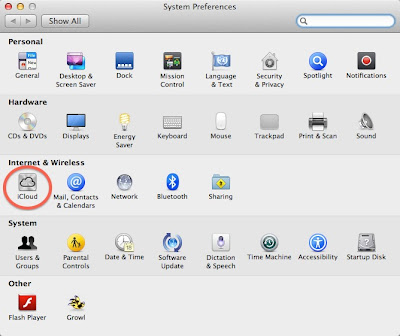
Open System Preferences by clicking the Apple icon in the upper left corner of the screen. Then press the iCloud icon, circled in the following screenshot:
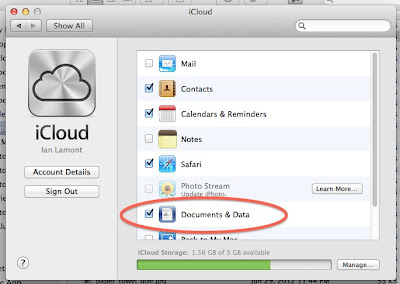
Then deselect the "Documents and Data" checkbox, as shown below:
You will be prompted with the following warning:
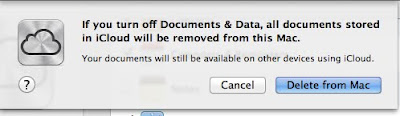
It sounds drastic. It means is that documents stored in iCloud (from any iCloud-enabled device you own) are no longer synced to your computer. But it also gets rid of iCloud as the default destination for saving or opening files.
It would be great if Apple simply had an option to treat iCloud as a folder on your hard drive, much in the same way Dropbox and other cloud storage systems such as Google Drive work (see also my manual for Google Drive). Or, Apple disabled iCloud as the default "save" location.
But the company has two reasons for integrating iCloud so tightly into your Mac's storage and file systems:
If enough people start turning off iCloud, Apple may rethink its approach to the iCloud user experience. On the other hand, as long as the competition is so strong, and the market for personal cloud services is still in its infancy, Apple may be forced to stick with the current setup.
So I changed it. Here's how:
Open System Preferences by clicking the Apple icon in the upper left corner of the screen. Then press the iCloud icon, circled in the following screenshot:
Then deselect the "Documents and Data" checkbox, as shown below:
You will be prompted with the following warning:
It sounds drastic. It means is that documents stored in iCloud (from any iCloud-enabled device you own) are no longer synced to your computer. But it also gets rid of iCloud as the default destination for saving or opening files.
It would be great if Apple simply had an option to treat iCloud as a folder on your hard drive, much in the same way Dropbox and other cloud storage systems such as Google Drive work (see also my manual for Google Drive). Or, Apple disabled iCloud as the default "save" location.
But the company has two reasons for integrating iCloud so tightly into your Mac's storage and file systems:
- iCloud only has 5 GB of free storage. By forcing iCloud as the default storage location, the limit will rapidly be crossed and some people will be forced to upgrade to paid storage plans.
- Apple wants to make sure that its personal cloud storage system triumphs over competing products such as Dropbox and GDrive.
If enough people start turning off iCloud, Apple may rethink its approach to the iCloud user experience. On the other hand, as long as the competition is so strong, and the market for personal cloud services is still in its infancy, Apple may be forced to stick with the current setup.
Sunday, August 5, 2012
Laptop fires and data recovery: The lesson I learned

Now it's possible to perform DIY hard drive recovery or get pros to do it for you. I've never tried any of these methods, however, and there is a cost attached.
Since the fire, I have used a variety of methods to back up my data. Emailing myself copies of important files was simple, but very hard to manage. I have also used external hard drives (including one that I keep in a fire-proof safe) but there is a cost and management overhead. There is also a niggling worry -- what if the backups are lost or stolen as well?
Now, I use Dropbox for all of my writing, and for many other backup purposes as well -- photos, business documents, shared work projects, etc. What is Dropbox? As I explain in my book, Dropbox In 30 Minutes, Dropbox is an online storage utility that is simple to use, and makes remote backups that are very easy to recover. The free version comes with 2GB of space, which is more than enough for most writers (you can also expand this to 18GB through various means).
I describe how to set up and optimize Dropbox in my book, which includes everything from installation instructions to a FAQ. Read the table of contents to learn more, or search for Dropbox In 30 Minutes in the Kindle and Nook stores.
Photo: Flickr/renaissancechambara via renaissancechambara's blog, Creative Commons license.
Sunday, July 22, 2012
Tech support stories: "id 10 T" and other IT acronyms
Years ago, I developed an online community for Computerworld called Shark Bait. It was targeted at IT staff, and anonymous users often shared stories from their workplaces. Sometimes they were about confusing technologies (which everyone has suffered through) or frustrating office politics. At other times, the stories were about people failing to follow instructions, mixing up different technologies, or otherwise behaving in a clueless matter when calling the IT support desk ("where can I get a Google Docs for Dummies?"). No names were ever used in these stories, of course.
 I recently spotted a reddit thread about the secret codewords that are used at some companies to describe certain types of customers. A gaggle of IT staff weighed in with their code names for stupid computer users, starting with this comment:
I recently spotted a reddit thread about the secret codewords that are used at some companies to describe certain types of customers. A gaggle of IT staff weighed in with their code names for stupid computer users, starting with this comment:I work at an IT center. We regularly talk about the "id 10 T" error. Meant that we were dealing with an idiot.Other terms/acronyms followed:
- PICNIC: Problem In Chair, Not In Computer
- TSTO: Too Stupid To Operate
- EBK: Error Behind Keyboard
- EBCAC: Error Between Computer And Chair
- PEBKAC: Problem Exists Between Keyboard and Chair.
- Layer 8/9 error: There are seven layers in the OSI model of computer networks. The 8th layer is the user.
- Code 18: The problem is located 18 inches away from the monitor.
- EEOC: Equipment Exceeds Operator Capabilities
- FB-PC: F***tard behind PC
- OHE: Operator Headspace Error
- C2K: "Chair to Keyboard" problem
- CBE: Carbon-Based Error
- ESO: Equipment Smarter than Operator
When tech support acronyms go too far
While secret codewords and acronyms help IT staff relieve the boredom or frustrations of their own jobs, it's cruel to be on the receiving end of these jokes. Sometimes, things can go too far. It's easy to create a culture of "us vs. them" or build up so much contempt for users that a culture of mutual hostility emerges and festers.
To wit: Jimmy Fallon's SNL character, "Nick Burns, Your Company's Computer Guy":
(Sorry, I couldn't find any longer videos of Nick)
(Sorry, I couldn't find any longer videos of Nick)
Tuesday, May 15, 2012
Yahoo's Synced Messages folder

A few million Yahoo users (including me) got this message in our inboxes this morning, explaining the mysterious "Synced Messages" folder that had been added to our accounts. Here's the explanation we received:
At Yahoo!, ensuring the safety and security of your data is important to us, and we know how critical your email is to you. We recently experienced an issue syncing emails for some of our users when accessing email from an IMAP device like an iPhone or an Android phone. Emails that you might have moved from your inbox to folders (including the trash folder) may have been temporarily unavailable. We fixed this issue, and recovered emails that may not have been synced to the right folder.
This is what you can expect to see:
- We have automatically added a folder called "Synced Messages" to your email account today located in the left navigation of your inbox.
- Our systems identified emails that may have been subject to the syncing issue and added them to the "Synced Messages" folder.
This is what you should do:
- Open the "Synced Messages" folder and move any messages you wish to keep to the inbox or your other personal folders.
- After you move the messages you wish to keep, you can delete the remaining messages in "Synced Messages" folder as well as the folder itself. The "Synced Messages" folder will remain in your account until you delete it.
At Yahoo!, we strive to give you the best email experience possible. We apologize that some email was not synced properly, and please know that this issue has been fixed.
You may also be interested in:
TMobile monthly 4G + Samsung Exhibit II = Android on the cheap
Thursday, September 22, 2011
Website development and the importance of technical cofounders
(Update: Since writing this post, I have launched a company which is dedicated to helping people understand complicated technologies and concepts. Besides creating online posts which address questions such as What Is Dropbox and What Is Google Drive, I have also published a series of guides under the In 30 Minutes brand.)
An acquaintance recently contacted me about an idea for a Web startup, using social media to bringing together people interested in humanitarian causes, art, positive change, etc. The problem she had, and it's a problem that I think is quite widespread, is she doesn't have the required coding skills. I responded with the following message:
An acquaintance recently contacted me about an idea for a Web startup, using social media to bringing together people interested in humanitarian causes, art, positive change, etc. The problem she had, and it's a problem that I think is quite widespread, is she doesn't have the required coding skills. I responded with the following message:
Regarding your idea for a social media site (or network?) it sounds pretty interesting, and there are definitely niches out there that are not being well served by Facebook, Linkedin Groups, or existing Web forums.
That being said, I would be very careful about what area you target, as there are many existing services that address some of the areas that you named below -- Jumo, http://www.humanitarianforum.org/, some specific art-oriented communities, etc. Convincing users to join your site when there are already compelling services out there with large user communities is more difficult than targeting an unserved or underserved population.
In addition, in my experience creating user communities and blogs in the past, I have found that very tight niches ("South Florida Artists for Peace") are much easier to gain traction than broad communities ("Worldwide Artists for Positive Change and Humanitarian Causes").
As for the nuts and bolts of creating the community, the good news is that there are many existing software platforms out there that make it much easier to get started, and good coders will know how to use them.
The bad news is that good coders can be hard to find -- there is definitely a shortage of engineering talent, and you will be competing against larger companies and funded startups for them.
But there is a silver lining: There are many software developers who are currently working as employees who are interested in co-founding a company. The question then arises of how to find one who likes your idea, recognizes the skills/connections you are bringing to the table, can brainstorm/collaborate on how to move the project forward, and finds the opportunity worth pursuing.
In my opinion, the co-founder has to be someone you can meet in person on a regular basis -- that's how trust gets built, and ideas can move forward much more quickly than by sending emails or relying on Skype. You can work your local networks, or start attending local entrepreneurial meetups (preferably technology-oriented events). If there are none in your area, try organizing one and bring in one or two speakers that startup founders would want to hear from (for instance, a local lawyer talking about LLC vs S-Corp formation, or someone who has founded a successful startup in the past).
Plan B would involve outsourcing all of the coding using Guru.com, Elance, or remote developers recommended to you by someone else. The problem with this approach, besides the cost, is working out the software specifications and deliverables can be very frustrating if you've never done it before. It's possible to find developers who can help walk you through the process, but even still the chance for misunderstandings and "scope creep" is very high -- another reason to find a technical co-founder.I didn't get into the details of some of the software components that could be used to make such a site, but when I heard the idea I immediately thought of open-source content-management systems such as Joomla and Drupal, and authentication tools such as Facebook Connect and Twitter's xAuth/OAuth that would let people use their existing social media identities to authenticate/register and easily distribute the site's content and discussions elsewhere.
Monday, August 8, 2011
Learn how to write: One word you need to know
I have a one-word piece of advice for anyone who wants to learn how to write:
Blog.
Don't worry about which software to use, how to customize your template, or how to promote your thoughts. Just find a service that lets you start writing right away, and then start writing about what interests you or inspires you.
If you feel intimidated by formatting or structure, a trick that works well is pretend you are writing an email to a friend, explaining to that friend something that he or she may not understand very well. Real friends or strangers may start to read your posts. How do they respond to your presentation of facts, observations, and arguments? Use the feedback to tweak your approach.
Your organization and "voice" may seem awkward at first, but regular practice -- every day, if you can manage -- will help you develop your skills. After 100 hours you'll notice a big improvement. After 1000 hours, you will be well on your way to being a master.
Subscribe to:
Posts (Atom)