Showing posts with label ebooks. Show all posts

Monday, November 2, 2026

No, science fiction does not magically turn readers into "technocratic libertarians"

I am a big science fiction fan and have seen many online claims about Musk, Altman, and Bezos being shaped by reading pulpy sci-fi novels into becoming "technocratic libertarians," as discussed in the Techcrunch interview with historian Jill Lepore. I have to ask: Where's the evidence? 

Lepore, in her response to TechCrunch's Anthony Ha, says "I guess Bezos is a big Robert Heinlein fan" which hardly sounds conclusive. That is followed by a lot of back-and-forth talk about Asimov and other science fiction thinkers. 

No one is disputing that these billionaires didn't read science fiction. One journalist writing about Amazon noted that the only work of fiction on Bezos' office bookshelf in the early days was by Larry Niven, the author of Ringworld. Musk took an invented word from Asimov ("grok," which means to understand) and applied it to an AI in his social media business. He also likes building rockets and a business built on space exploration. 

But so what? I read Heinlein and Niven and Asimov when I was young, too, along with a bunch of great works by Delaney and Wolfe as well as pulpier stuff by James P. Hogan and Ben Bova. Does that make me and millions of other science fiction fans technocratic libertarians? If not, why do people regularly point to science fiction as the source of these three men's libertarian leanings? 

We've moved way past "magic bullet" theory of mass media -- the discredited idea that a media message triggers an identical response across anyone seeing it. 

Maybe people like reading science fiction for the stories, the settings, and the speculation, and nothing more. It might influence them to get excited about space, but so can watching the broadcast of a Space Shuttle launch or pictures from Voyager 2 as it passed Saturn. To go from "reading science fiction" to "liking space" to "turning into a technocratic libertarian" is a major stretch.  

Thursday, December 10, 2015

The evolution of reading in the digital age

In the past few years, a lot of people have remarked about how their reading habits have changed. Here’s an example I saw on Hacker News earlier this week:
I was a good reader throughout my childhood, youth and academic years. Lately, and after a couple of decades, it's becoming increasingly challenging to focus, consume and finish books. I'm becoming the modern age illiterate. I'm usually squeezed for time - but even if I find some, I don't pick up where I left.

Does anyone encountering the same challenge? Any ideas/tips that could help overcome the cycle? Do you think it's caused by modern information overload, distraction addiction, or perhaps dealing with short cryptographic lines of code?
I know exactly what he or she is talking about. I loved reading when I was younger, everything from newspapers to novels. I took a long break from reading for pleasure when I started my first graduate degree in the mid-2000s, and never really got back into it. Part of the reason is I don’t have enough time to read. I am very busy with work, even on the weekends and in the evening (after dinner is actually my most productive writing time). When I do have free time, I like to spend time with my family. I can watch TV with them or even play video games with my son. But it’s hard to share a book.

But there’s something else. My reading habits have really changed. What I find myself doing now with most long-form Web or mobile content, as well as printed magazines and newspapers, is skimming to get the basic facts or quotes and then moving on. I just don't have the time or attention to stay focused anymore.
e-readers and digital text - Kindle Fire, iPad and Kindle paperwhite 

As for books (fiction and nonfiction), I find myself skimming when I use the Kindle. The Kindle Fire is even worse because of the easy access to other distractions. For printed books I can focus but I have found my threshold for abandoning a book is much lower. I did this recently with a novel by an author I used to love (Martin Cruz Smith if anyone is curious). I just felt the characters in the new novel were wooden and I noticed some basic editing errors. I returned the book to the library after about 40 or 50 pages.

One of the commenters in the Hacker News thread speculated that the community focus on programming in bursts while looking at snippets of code all day may explain the change. But that hypothesis doesn’t hold for me … I don’t look at much code. Indeed, a large part of my day job involves looking at or writing long pieces of text for the In 30 Minutes series.

Rather, I believe the change in habits results from a combination of information overload, easy access to screens, and training our minds (through exposure to text messages, tweets, online updates, short video clips, etc.) to prefer condensed communication.

It’s an uncomfortable trend. On the other hand, I also see it as part of the evolution of media and society. If we look back through history, we can see how other new media had a similar impact. Newspapers, film, and television changed styles of writing and peoples' preferences for reading materials and storytelling. Then, as now, there was great discomfort in the way media and storytelling evolved. A 1961 speech by the then-chairman of the FCC called television a "vast wasteland." If you go further back, there was negative reaction to the introduction of radio, the use of photos in newspapers, certain types of stage plays, and even opera, which was seen by 17th-century British intellectuals as "chromatic torture."

There has been a lot of thoughtful expository writing about this; if you are interested (and can manage to read an entire book) I recommend checking out Mitchell Stephens "The Rise of the Image, the Fall of the Word" and Walter Ong's "Orality and Literacy". They are somewhat dated now, but I think they really documented important transitions from antiquity to the end of the 20th century.

Tuesday, March 11, 2014

What does # mean in twitter? (Or, all about hashtags)

(Excerpted from my Twitter guide, Twitter In 30 Minutes.) You may notice that some words in tweets have the hashtag or pound symbol (#) added to the front. Occasionally, there will be a hashtagged phrase or acronym with all of the spaces and periods removed, like #thingsthatbotherme. What does # mean in Twitter? The blog post below explains how to use them, as well as some hashtag no-nos.

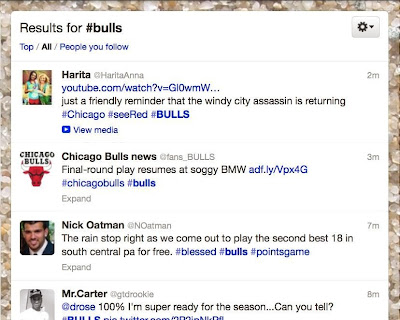
Hashtags are a Twitter convention that lets people easily find tweets about the same topic. By adding a hashtag to the front of a word or phrase, it turns it into link that is hooked up to Twitter’s search engine. Click the link, and the most recent tweets that include the same hashtag are displayed. Here’s what shows up when I click on #Bulls:

Twitter hashtag example: #Bulls

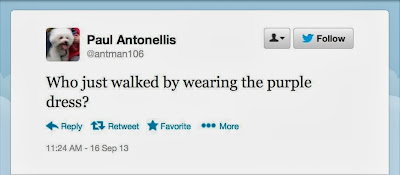
Hashtags serve other useful functions as well. They alert other Twitter followers to the fact that the tweet is about a certain topic that may otherwise not be apparent. Let’s say you’re watching the Oscars on TV, and you see someone wearing a beautiful dress glide by the camera. You could ask your Twitter followers:

Twitter example clothing

Many people may not know what you are talking about. But they will if you add:

Twitter example Oscars #oscars

By adding #oscars, it’s clear you are talking about the awards ceremony, and not something else. Moreover, if any follower clicks the #oscars link, they’ll see all of the other tweets tagged “#oscars”.

Sometimes people create funny hashtags. The television host Jimmy Fallon and his writing team are especially skilled at this. They ask their viewing audience a funny question and then tell them to use a hashtag to let the writing team (and other viewers) see the answers. Here’s are some of the responses to his hashtag #WorstCarIEverHad:

Twitter Jimmy Fallon hashtag example

Hashtags are also used to tag sporting events (for instance, #olympics), political races (#election2016), conferences (#ces2014), and practically any other event you can think of.
Some new Twitter users make the mistake of turning every word in their tweets into hashtags. Here’s an example:


It’s irritating and unnecessary. They tweets are hard to read. In addition, hashtagging common nouns, verbs and other words doesn’t add any value if people click on the hashtags.

Another mistake involves using the wrong hashtag. For instance, followers of the Boston Red Sox generally use #redsox to talk about their team, not #bostonredsox or #sox.

Mistakes can also happen when a single hashtag is used by two different groups of people. Check out #gastro, which is used by people who like gourmet food as well as doctors and scientists who are interested in discussing gastrointestinal diseases:

Bottom line: Choose your hashtags carefully. If I am interested in using a particular hashtag in a tweet, I often search Twitter first to make sure it’s the appropriate one to use.

Friday, April 5, 2013

Excel book: Sales get a boost in March, but why?

Excel Basics
A strange thing happened in March. My book about Excel Basics, which had resisted numerous attempts to boost sales, all of a sudden starting getting traction. Sales for Excel Basics In 30 Minutes weren't nearly as good as Dropbox In 30 Minutes or Google Drive & Docs In 30 Minutes, but they were nearly double the levels for January and February. The book's "Paid In Kindle Store" ranking, which had never dropped below 300,000 before February, finished the month of March at #157,675.

Before I put forth some of the hypotheses for March, let me describe some of the things I tried in previous months to boost sales:
  • Changed the name: Started with "Spreadsheets In 30 Minutes", changed to "Excel In 30 Minutes", then "Excel Basics".
  • Made slight changes to the metadata (keywords, descriptions) in Amazon.
  • Posted Excel tutorial videos and other resources on the product website and YouTube
  • Lowered the ebook price from $8.99 to $5.99

Out of all of these activities, only the price cut seemed to have any impact on sales, and it was marginal.

Then came March. Sales nearly doubled. There were increases in Amazon, Createspace, and iTunes sales. Even B&N (manufacturer of the Nook) saw a few more sales in March than the previous month.

What happened? I have a few hypotheses:
  1. A change in Amazon categories (it's now listed under Education, rather than Computers) revealed it to a new group of potential readers
  2. The Goodreads Giveaway I launched on March 11 resulted in purchases by people who didn't want to wait until mid-April to learn if they had won a copy.

The problem with both of these hypotheses is they are difficult to test. Amazon and the other platforms don't share with authors where buyers come from, or how changing categories directly or indirectly impacts sales. While it's sometimes possible to track activity through the use of affiliate program codes, which I use on my product websites, Goodreads uses its own affiliate codes, meaning I cannot see the data generated by buyer clicks.

In any case, I am happy with the increase and looking forward to seeing what happens to sales of Excel Basics In 30 Minutes this April. The Goodreads Giveaway already has 190 registered readers, and the total should break 200 by the time the registration ends April 11. Of the registrants, 25 will get free books … but there are still nearly 200 other people who have indicated interest in the title. Will they end up buying a copy?

Fingers crossed ...

Saturday, December 1, 2012

Image problems with self-published books on the Nook HD


This week I was able to try out the Nook HD for the first time. It's a sharp little e-reader that I would buy in a second if I had the extra cash. It's lighter than the iPad, has a nice form factor, has a far superior UX to the Kindle, and handles video and even gaming graphics quite well. When you open an ebook on the Nook HD, the pages look crisp and have a nice off-white background. But I observed a problem with the way the Nook HD renders images on self-published books.

I observed the problem in one of my own books, a basic Excel manual that I published earlier this year. The images, which were intended to have full-screen widths, were reduced to about 50% of the page width. This made details impossible to read. Of course, it's possible to "blow up" the image by tapping on them, but that ruins the reading flow and also takes time (there are about 100 screenshots in this guide).

I don't have Nook HD screenshots to share, but I'll try to illustrate the problem with some facts and a sample image from the book that was made unreadable. The Nook HD has 1440 x 900 pixel resolution with 243 pixels per inch. This means an image that's half the width of the screen (450px) will be 1.85 inches wide. Here's what a 1.85 inch wide image from my book looks like in a browser (96 ppi):

Nook HD image problem

Do you see the problem?

The file format used by the Nook is an ebook publishing standard known as ePub. Apple's iOS devices use the same ePub files as the Nook. When I was working on Excel Basics In 30 Minutes, I tested the ePub file extensively in the e-reader that I own (an iPad2) as well as in the Nook simulator provided by Barnes & Noble's Pubit service. It looked great in the iPad. On the Nook HD simulator, the images were actually too large for the screen -- Pubit actually warns authors that images may appear strange. I assumed that they would be resized to fit the Book HD screen. Little did I know that they would be reduced to the point of being unreadable.

Any other authors experiencing this problem with their Nook titles?

Saturday, November 10, 2012

Lean Media: The Importance Of Intangibles And Brands

For several months, I've been working on a framework for Lean Media. The inspiration comes
from Eric Ries' talk about Lean product development (which I saw at MIT in 2010) as well as Ash Maurya's book Running Lean. Both Eric's talk and Ash's book focus on creating great software applications which people and organizations are willing to buy. But when it came to looking at media products through the Lean lens, I felt that two elements were largely missing from the rigorous, iterative processes they described:
  • Brand
  • Various intangible qualities 
In a sense, these elements are actually coefficients that can be huge multipliers for new media ventures or new media product launches by established players. In this post, I'll describe some of my thinking around intangibles and media brands. I'll also tie it into my own media startup, the In 30 Minutes family of books.

When I was first exposed to the Lean product development concept, it meshed with my experience in the media world (analog as well as digital). I knew that media products, (including websites, articles, video, songs, albums, books, and photographic works) do not  require long, complicated, perfectionist, top-down production cycles to be great.

In the world of pop music, there have been a host of bands who have created great songs on a shoestring budget and/or on a short production cycle. Led Zeppelin II and Rebecca Black's "Friday" are examples. For digital content, niche news blogs like TechCrunch, Mashable, and PaidContent basically started out as one-man operations. People may debate whether such content is "great", but regardless, all of the examples listed above resonated with audiences.

On the other hand, the success of these media products cannot be attributed to Lean product development techniques alone. The Lean methods failed to take into account intangibles such as:

  • Dynamics between content creators. Think of the song you like the most, and consider what would happen if it had a different producer or co-creator. Using the example above, how would have Led Zeppelin II fared in terms of the composition process and audience reaction without John Bonham on drums?
  • The value that audiences place on perceived quality.  
  • Other intangible qualities: The sound of a cellist's bow, the "voice" of a great columnist, the design of a classic magazine, the photographer that always manages to get that special shot.

Media-specific intangibles are not guarantees of success, nor are they required for new ventures. But they sure can help.

In addition, there is brand power. Brand power is real, and can give a new venture/media product a  receptive audience and "halo effect" even if the product is otherwise lacking.

For example, for anything Jerry Seinfeld attaches his name to, I am inclined to think it will be funny and worth my time. Likewise, when the New York Times launches a new digital feature, mobile app, or book, not only am I likely to use it, I have a belief that it will reflect high production and editorial standards. Therefore, media brands can create additional value, regardless of whether they were the products of Lean product development or multimillion-dollar productions.

How does "brand" apply to my ebook venture? I'm not famous, and I haven't been around for that long (the ebook venture was launched less than five months ago).

But that doesn't mean that brand development should be left out of Lean product development cycles. When I wrote my first book, a Dropbox guide, I knew that it wasn't enough to simply create great digital content using Lean methods. It's possible the reputation for quality might eventually lead to large numbers of sales for individual ebook titles. However, the reputation of an author takes a long time to build, and the cross-pollination effect among different titles would be limited. I saw the addition of a brand layer (including text and design) bringing several benefits:

  • A brand distinguishes the titles from online, ebook, and print competitors.
  • It makes readers more willing to accept a higher price point. The release of a new title in the same brand family (e.g., Excel In 30 Minutes) can follow the pricing of earlier titles (Dropbox In 30 Minutes). 
  • It helps readers remember the title and/or design. This might be useful when they see a similar title that's part of the same brand family (follow-on purchase), or when they recommend it to other people (word of mouth).
  • It can make bundling titles easier. I haven't done this yet, but it's an option to increase sales through my product websites.
  • A brand can extend the series to topics written by other authors. I haven't tried this yet, either, but it will come up in 2013.

For my very first book, Dropbox In 30 Minutes, I created the "In 30 Minutes" brand. After I validated customer demand, I commissioned a professional designer to create a brand identity (see my post, "Do people judge an ebook by its cover?") Both the text and visual brand elements have been applied to follow-up titles.

I have some evidence (but no proof) that the branding has helped with sales of my second book (a guide for how to use Google Drive). I am also interested in seeing audience response to "In 30 Minutes" titles written by other authors, as well as bundled titles. In other words, it's still too early to tell ... but I believe getting an early start on branding will help grow the venture in the long run.

The Lean Media framework is still being developed. Its goal is to help media startups and established media companies develop great products that people want to use or consume. I would love to get feedback from people in the media and startup industries, as well as consumers. Feel free to leave a comment below, or contact me at ian -at- in30minutes dot com.

Sunday, October 28, 2012

Scrivener: How to add a cover image when compiling a PDF

I'm in the process of creating various types of formats for Excel Basics In 30 Minutes, my latest ebook about how to use Excel. These days, I am using Scrivener for most production tasks. It can export to .mobi, ePub, and other print and electronic formats with ease. But I discovered that the Compile settings window does not include an option for including cover images in PDF files, as is available for ebook formats.

Fortunately, there is an easy workaround. Here's how:
  1. Assuming you are using a Front Matter folder (recommended by Scrivener), create a new text file (right click on the folder title>Add>New Text. 
  2. Title the file whatever you want, and make sure it is in front of the other front matter (see circled file in the screenshot below)
  3. In the text file, go to Edit>Insert>Image Linked To file. "Image Linked To File" lets you scale the image inside the page, instead of having to use an external editor like Photoshop, Paint, or Preview to get it to the right pixel count. Double-click to scale the image down if it's too big.
  4. In the Contents pane of the Scrivener compile window, Cover Image should be the top item if you are including the Front Matter folder. Check "As Is". This tells Scrivener not to include the name of the text file, only the contents (which is the cover image).
  5. Compile.

Here's the way I set up the cover image in my own Scrivener project file for my "Excel for Dummies"-style book:


Friday, October 26, 2012

What is Google Authorship?

This morning, I received a notification that I had joined Google Authorship (see screenshot, below). I had never heard of this service and assumed it had something to do with the three books I have authored, including one (an unofficial manual for Excel and other spreadsheet programs) that was published just last night.

It turns out it wasn't. If you look at the following screenshot, you'll notice that it mentions that I've added "Google Authorship markup":

Google Authorship notice

I don't know what "Google Authorship markup" is, but suspect it's related to my heavy blogging activity over the years (including recent product sites based on Google Blogger, such as Dropbox In 30 Minutes and Google Drive And Docs In 30 Minutes) as well as the fact that I've circulated some recent posts and product pages on Google Plus.

Indeed, clicking through to the "search results" link at the bottom of the Authorship notice, I'm taken to fourteen SERPs of mostly blogs, Google Plus entries, and some YouTube videos I've created over the years. The list is not complete -- I've written more than 1,000 pieces of indexed content if Computerworld and non-Google blogs are included. But the Google Authorship collection online has a limited selection of posts that are tied to my main Google account.


Tuesday, October 2, 2012

Trying an experimental fiction approach for my next book. Feedback needed!

Can fiction techniques be effective in introducing nonfiction or educational topics? I occasionally see it used in other media. For instance, documentary film and television producers sometimes use "dramatizations" to tell a story. But what I'm experimenting with tonight are completely fictional characters, used to introduce a rather dry software topic.

Here's the first 1000 words or so of "Spreadsheets In 30 Minutes," which aims to bring people up to speed on basic techniques. Let me know what you think in the comments section:


Chapter 1: The Resolution

“Never again!”

It’s Monday, January 2, and a small group of Midstate Health customer service reps are scattered around the small break room. The speaker is Jennifer. She’s a redhead, in her early 20s, and she’s rubbing her temple, with her eyes clenched shut. In front of her is a cup of office coffee. Black.

“Tsk, tsk.” says a man in a grey suit, as he washes out his mug by the sink. It’s Simon, the British manager. Simon is perpetually teasing his American colleagues about everything from driving habits to restaurant names. “Partied a bit hard over New Year’s, did we? Too much of that fizzy yellow stuff in tins you Americans call ‘beer,’ hmmm?”

Kara, the office computer guru, rises to the bait. “At least the New Year’s Day football games are for real,” she says. “What do you Brits do for sport? Cricket in a suit and tie?” That gets a chuckle from the others in the room.

Simon raises a finger. “I’ll let you know that --” he says, but Jennifer cuts off the discussion with a wave.

“No, it’s not a hangover or anything like that,” she says. “It’s the stupid New Year’s resolution I made.”

Simon looks intrigued. “What, pray tell, have you promised?”

“It’s so stupid,” she says, shaking her head. “I don’t even want to mention it.”

“No, go on,” Simon urges. “We won’t jeer at your weight-loss goals when you inevitably miss them. Shall we, Kara?”

Kara stares at Simon for a few seconds, and then turns to Jennifer. “Seriously, Jen,” says Kara. “We’re all behind you. Right everyone?” The others around the room nod in agreement.

“Well, OK,” says Jennifer. “Simon, remember how you said we had to have a minimum set of computer skills to be considered for the senior rep position?”

“Of course! And very few of you lot even come close. Why, Kara, you even had to show young Jennifer here how to change printers, didn’t you?”

“Yeah, but a lot of people have trouble with that.”

“Printers aren’t the problem,” Jennifer says. “It’s spreadsheets. My new years resolution is to learn spreadsheets, so I can apply for that position.”

A murmur rises around the room but there’s a bark of laughter from Simon. “Spreadsheets? You? You can hardly use a bloody calculator.”

Jennifer closes her eyes and begins rubbing her temple again.

“Now hold on, Simon,” Kara says. “I don’t think learning how to use a spreadsheet program is that hard at all.”

Simon turns to her. “You’re the IT person. Of course you would say that.”

Kara declares, “I bet Jen can learn the basics in 30 minutes.”

“You must be joking!” Simon says. “I don’t think anyone can learn how to use a spreadsheet in 30 minutes, even the basics.”

Jennifer speaks up. “Kara, I don’t think so. It just looks so hard. I mean, I look at all of the buttons and boxes in Excel. It’s all Greek to me.”

Kara responds, “that’s what everyone thinks. But it’s quite easy, once you try a few things on your own. Spreadsheets are not just for geeks in bad suits.”

The crowd bursts into laughter. “Hey!” Simon huffs.

“Just kidding. But seriously, Simon. I can really teach her the basics in 30 minutes.”

Simon gets a crafty look on his face. “I’ll tell you what, Kara” he says sweetly. “If you teach Jennifer the basics of Excel -- and I would expect that to include entering data, xxxx, and making charts -- I’ll make sure Jennifer gets that promotion.”

Jennifer looks worried. “But what if I don’t?”

“Well, you just won’t get that job, will you? And Kara here will have to take everyone in office down to my favorite pub for a round of real beer.”

“Mister,” says Kara, holding out her hand. “You’ve got yourself a deal.”

Chapter 2:

Jennifer and Kara hurry back to Jennifer’s office. “Kara, this is a big mistake. I can’t do this, and you’re going to have to buy a round for everyone.”

“That’s what Simon thinks,” says Kara, with a smile. “He’s in for a surprise.”

They get to the Jennifer’s office. Jennifer sits down at her computer. Kara pulls up a chair nex to her, and opens her laptop.

“Jen, turn on Excel,” Kara says. “I’m going to use a similar program called Google Spreadsheets. They are pretty much the same, except I’ll be accessing Google Spreadsheets through a Web browser.”

“OK,” Jennifer says. “I turned Excel on.” This is what they see:


<SCREENSHOT>

Kara points at the screen, and starts explaining the elements.

“The small rectangles that fill a spreadsheet are called ‘cells.’ They are designed to hold numbers (for instance, 5, 26.2, $500 or 98%) as well as text (for instance, names, abbreviations, and x)”.

Jennifer says, “so, basically, you can type anything in a cell.”

“That’s right. Sometimes, people will type a reference in one cell that points to another cell as part of a formula. But we’ll come back to that in a minute.”

“OK.”

“Because there are so many cells, spreadsheets use a simple system to identify each one. You see how the top of each column is labelled with letters, while the rows on the left side are labelled with numbers? You just match the letters on the top and the numbers on the left to identify each cell.”

“Oh, it’s just like the game ‘Battleship’.”

“Exactly!”

“But what if there are more than 26 columns?” Jennifer asks.

“The 27th column is labelled AA,” Kara answers. “The 28th column is labelled AB, et cetera. When it comes to the 53rd column, it starts with BA, BB, BC …”

“OK, I get it.”

“Let’s do a quick exercise right now,” Kara says. “Find cell A2. It’s the second cell from the top of column A.”

“I see it.”

“Great. In A2, type your name, and press return.” ….


What do you think? Is this an effective way to structure a software guide?

Monday, September 3, 2012

iBookstore agreement: Do you really understand the fine print?

I'm in the process of posting one of my books (Dropbox In 30 Minutes) to Apple's iBookstore, using iTunes Connect. Apple's software platforms are heavily lawyered, and iBookstore is no exception: It's 13,585 words long, which would take between 30 minutes and an hour to read.

As an author, even if you did read everything, would you understand it? Here's just one paragraph:

APPLE, ISSUER, AND THEIR LICENSEES, AFFILIATES, AND LICENSORS MAKE NO WARRANTIES, EXPRESS OR IMPLIED, WITH RESPECT TO VOLUME VOUCHERS, THE VOLUME PURCHASE PROGRAM, THE APP STORE OR THE ITUNES STORE, INCLUDING, WITHOUT LIMITATION, ANY EXPRESS OR IMPLIED WARRANTY OF MERCHANTABILITY OR FITNESS FOR A PARTICULAR PURPOSE. IN THE EVENT THAT A VOLUME VOUCHER IS NONFUNCTIONAL, YOUR SOLE REMEDY, AND OUR SOLE LIABILITY, SHALL BE THE REPLACEMENT OF SUCH VOLUME VOUCHER. THESE LIMITATIONS MAY NOT APPLY TO YOU. CERTAIN STATE LAWS DO NOT ALLOW LIMITATIONS ON IMPLIED WARRANTIES OR THE EXCLUSION OR LIMITATION OF CERTAIN DAMAGES. IF THESE LAWS APPLY TO YOU, SOME OR ALL OF THE ABOVE DISCLAIMERS, EXCLUSIONS, OR LIMITATIONS MAY NOT APPLY TO YOU, AND YOU MAY ALSO HAVE ADDITIONAL RIGHTS.

I kind of get the gist of it -- Apple is not making any guarantees regarding the voucher program -- but then it dissolves into vague lawyerese at the end. I don't quite understand it, but what choice do I have? What choice do any of us have, when we "agree" to a software license, or EULA, or terms, or TOS, or 50-page legal document?

Friday, August 31, 2012

Branding Google Drive

Google Drive book

Over the past two weeks, I have been preparing book #3 for publication. It's now out. This Google Docs for dummies alternative is available through my product website, and offers an easy way to get up to speed on Google Docs, Google's powerful online office suite. It also covers Google Drive's offline storage capabilities. However, as I explain in the book, the storage features aren't nearly as good as Dropbox.

One of the new sections in the book gets into the tricky issue of branding Google Drive. As old-school users know, it's been "Google Docs" for more than five years, but this year Google began changing the branding to "Google Drive". Instead of accessing Google Docs through docs.google.com, it's now drive.google.com. While "Google Drive" may be a good fit for the storage features (and helps it compete with Dropbox and iCloud), it does not represent the office suite (Google Documents, Spreadsheets, Presentations, Drawings, etc.). However, I've noticed on a Google Apps help page that "Docs" is not completely going away:

When Google Drive first launches, the name of the service in the control panel will change from Docs to Drive and Docs.

However, in the consumer version of Google Docs, it's only branded "Google Drive". It's confusing for users. The only way to keep things sane is to refer to the office programs as "Google Docs" and the file/storage components as "Drive".

Monday, August 13, 2012

LendInk Witch Hunt, Part II: It's gone too far


Last week, I documented the closing of a legitimate ebook lending service in "What happened to LendInk? The owner responds." The reaction to those authors who had helped bring LendInk down -- either through joining the Internet torch mob or sending "hundreds" of cease & desist letters (and apparently some DMCA takedown notices) -- was characterized by fury and outrage. Here is a sample from LendInk's Facebook page:
"I read nearly every comment on this page. From the countless authors that carelessly destroyed Dale's business, I saw only two apologies. You took something that was designed to help you and was perfectly legal, and smashed it in to the ground. You should be ashamed of yourselves."
The anger is understandable. LendInk owner Dale Porter was providing a community service to readers, and abided by the terms of Amazon's and Barnes & Nobles respective ebook lending and affiliate programs. But his site was driven off the Internet by a baying mass of authors (indie and otherwise) who either:

  • Didn't understand ebook lending (or the terms they had signed with KDP and PubIt)
  • Thought that LendInk needed permission to use affiliate images and links
  • Mistakenly thought LendInk was posting pirated copies of the ebooks
  • Blindly piled on because everyone else was. 

I excerpted one of the comments on my original blog post, but you can see more of them on LendInk's Facebook page from earlier in the month:


The authors who participated in the frenzy are now reaping what they have sown. The criticism is deserved, and many are apologizing on LendInk's Facebook page and elsewhere:
"I was one of the misguided authors involved. Though I didn't send a DMCA, I did come here to this page and ask for my titles to be taken down. For this I am truly sorry though I'm sure it's too little and too late. It's the least I can do. … I feel horrible about the part I played in this and how far it's gone."
Other author apologies are popping up on Twitter, in online forums, on Goodreads, and in the comments section of my blog post. There is also a lot of discussion about what went wrong and the factors that led to this state of affairs.

But for the authors who are silent or unrepentant, a new torch mob has emerged, targeting them for personal attacks and outright revenge.

One of the people who was targeted was an erotic fiction author who left the comment on Kindleboards that I cited in my blog post. She removed the comment from Kindleboards, and later posted this comment, claiming she had been subjected to personal attacks:
"The one who fired abusive comments directed toward me, my books and other writers who were only standing up for their rights, shame on you! Your emails and abusive threats are all accounted for, so please, continue to dig your own hole. Hopefully you will have enough grace to go hide in it, and fester there alone with your hate." 
It went beyond personal attacks. Someone gave her book a one-star review on Amazon, leaving this comment:
"33 Pages? $2.99? Really? from, let's face it, an unknown author. This adds up to... 9 cents per page.  
Additionally, apparently this Author considers anyone who treads on Author's rights to be scum, yet writes Cease and Desist letters for legitimate, fully legal sites because the author is unable to fully read and comprehend what is going on. Lack of reading comprehension, generally is not a trait i look for when seeking out authors to read. I highly recommend you avoid this one both for their over-inflated sense of their own work's value, and for their careless use of DMCA." 
Another person, posting on LendInk's Facebook page, put together a list of authors who had apparently been part of the first mob that slammed LendInk or demanded that their content be removed. After being challenged, the person who compiled the list added:
"They all collectively razed a legitimate business to the ground, leaving a small business owner with nothing but a mailbox full of threats, legal and personal. You don't think that should have consequences?" 
That list, along with more names, was copied to a blog post and expanded. Twitter and Facebook screencaps were added to prove they were part of the original anti-LendInk mob. Commenters joined in to add new names. At the top of the post, the blogger said:
"I will be attempting to add the author’s book pages at Amazon.com and BN.com so you can access what books never to buy in an easier fashion."
Despite the call for a boycott, and a new post that singled out an author who still insisted LendInk was wrong, the blogger claimed "I didn't encourage any sort of retributive action here whatsoever."

Surprisingly, there are even some authors who support retribution. I spotted this comment by a Canadian author on Kindleboards:
"I'm going to say this for what it's worth, and okay, it may be a controversial opinion... I think the authors involved with this deserve every one star rating they get.
They shut down a site that was bringing exposure to authors and providing a service to readers. In a very real way, they took money out of the pockets of authors as well as Dale himself, both for what LendInk was and for what it could have become. And for what? For the idea, the shocking idea, that someone, somewhere, might have gotten a copy of their book for free.
Not 'they did get a copy'. 'They might have gotten a copy'. They attacked LendInk without even knowing for sure that their livelyhood had ever been harmed.
If they had done any kind of due diligence, they would have seen that the lends went through Amazon's and B&N's systems, and it was not on LendInk if the books were not supposed to have that functionality. If they had done any kind of due diligence, LendInk would still be online. 
On top of that, it's one thing to destroy a legitimate business because it could be used for piracy, but it's quite another to destroy a legitimate business because you can't tell the difference between that and actual piracy. As far as I'm concerned, any of these authors that still maintains they did the right thing needs to get slapped around with bad ratings - there is no other way, realistically, for the community to punish them. The ones that apologise? It's good that they're willing, but they're not owed forgiveness from anyone, and if they continue to catch flak for what they did, then so be it (though they have my respect at least)."
As I said earlier, the offending authors deserve criticism for their actions. They should at least apologize to LendInk owner Dale Porter, and do whatever they can to right the wrong. But I am very disappointed to see a new witch hunt taking place, that has escalated to personal attacks, demands for "punishment" and "consequences", and bogus one-star reviews. It's a sign that mob mentality is taking over -- ironically, the very thing that helped bring down LendInk in the first place.

Things have gone too far, people. Let's keep the discussion going, but please end the vitriol and extreme actions that do nothing to help Dale and his business.

Wednesday, August 8, 2012

What happened to LendInk? The owner responds.

(Updated with comments from LendInk's Dale Porter, below. Several authors who originally opposed LendInk have responded in the comments section, below. I have also written a follow-up post, "The LendInk Witch Hunt, Part II: It's gone too far", which is linked from the bottom of this entry.

LendInk is no more (Update: It's back online, see note at the bottom of this page). The site, which matched up people who wanted to loan or borrow e-books, featured an easy-to-use interface (see screenshot, below). When a match was made, the parties were sent to Amazon or BarnesAndNoble.com to complete the e-book loan.

Loaning certain Kindle books in this manner is allowed per the Amazon lending terms and the rights outlined by the publisher. Here's how the Amazon help page describes the arrangement:
Kindle books can be loaned to another reader for a period of 14 days. The borrower does not need to own a Kindle -- Kindle books can also be read using our free Kindle reading applications for PC, Mac, iPad, iPhone, BlackBerry, and Android devices. Not all books are lendable -- it is up to the publisher or rights holder to determine which titles are eligible for lending. The lender will not be able to read the book during the loan period. Books can only be loaned once, and subscription content is not currently available for lending.
As an author (my books are in the how-to space, addressing topics such as what is Dropbox, What is Google Drive, and more), I don't have any problem with this type of lending service as long as it's not abused.

However, there are many publishers and independent KDP authors who did not understand loaning and lending on Amazon's Kindle platform. Others wrongly assumed that the titles appearing on LendInk were pirated. Here's how one angry KDP author reacted:
I noticed my work there and sent the site a Cease and Desist Notice, giving them 48 hours to remove my work or face prosecution. They were in breech of copyright and deserved to be shut down. Am I proud they have been shut down? Am I proud to have stood up for my legal rights as author? You betcha! If they were a legitimate site and had written consent from each and every author to display their work for free (forfeiting their royalty income as a result) then I doubt very much that the site would have suddenly disappeared overnight. I am tired of plagiarism, book piracy and cheap-*ss scum bags who won't part with a measly $2.99 or $4.99 to support authors and show respect for their hard work, not to mention the graphic artists, editors, photographers who also contributed to the birth of an author's ebook.
Although not legitimate, hundreds of C&D letters and other complaints helped kill LendInk, according to LendInk's Dale Porter (see my interview with him at the bottom of the page). Dale also posted the following explanation of what happened on several forums:

My name is Dale Porter and I am the owner of Lendink (or what's left of it). I can say without hesitation that Lendink was not a pirate site, we did not store, transfer, lend or publish any ebooks, period! All we did was attempt to provide a means for people that enjoy their ebooks to meet other like minded people and share their "lend" enabled ebooks. The lending process was completely handled on the Amazon or Barnes and Noble websites.

Lendink was operated solely by myself and operated the last couple of years with absolutely no income.

There is a lot of misinformation on the internet claiming that we hosted ebooks illegally, that Amazon did not allow us to lend ebooks, etc. Let me try to address some of those here.

Amazon did not allow us to lend ebooks. This is a 100% true statement and the fact of the matter is, Lendink did not nor did it ever attempt to lend ebooks. All we did was put person A in touch with person B and redirected A and B back to Amazon or Barnes and Nobles where the actual lending took place.

Lendink was hosting ebooks illegally. This statement is 100% false. We never hosted any ebooks on our servers. We attempted to dispell this rumor on our FAQ page and for those that actually read the page, it usually cleared up the misunderstanding. For those that did not read the page, all I can assume is that is simply doesn't matter at this point. No amount of explaination would have satisfied the vultures looming over head.

The Lendink website is down, this is proof they were pirating ebooks. Really, this is proof that we were pirating ebooks? The fact of the matter is that our host company was so overwhelmed with hate mail and threats of lawsuits that they felt they had no choice but to suspend the site. These hatefull people did nothing but harass and threaten Lendink and our host company to the point that it just didn't make sense to keep the site online. For those of you on this site that are patting yourself on the back for bringing Lendink down, shame on you. I only hope at this point that you see the same results with your books and your writing career.

Amazon dropped Lendink as an Affiliate due to digital rights violations or new digital rights laws in California. This is 100% false. Lendink is a California based company and as such, was cut off from earning money from sales when Amazon and the State of California disagreed over the collection of State Sales Tax. Amazon cut off all of their California affiliates from earning money via their affiliate program. It was not just Lendink. This only prevented us from earning money via Amazon. It did not however stop use from matching people for book lending.

I am simply a hard working guy that was trying to provide a legit service. Let me ask you all this, if I truley intended to use Lendink as a pirate site would I keep my contact information clearly associated with the site? Would I form an LLC and run the site as a business? Would I actually take the time to file for and receive a Federal Trademark for the site? These are not the actions of a person bent on stealing other persons intellectual property. The site had been negelected the past year or so and this was due to health issues related to my service connected injuries. Working a fulltime job to pay the bills and health issues just took their toll on me and unfortunately the site suffered. My plan was to ride out the Amazon vs. California Sales Tax dispute and then pick up when I was able to make some income from the sale of books. Sadly, it appears that my American Dream has been left as road kill at the hands of misguided individuals.

I contacted Dale with some follow-up questions, and he sent the following replies:

Who was threatening lawsuits? Was it authors, publishers, Amazon, other rights holders?

Dale: "At this time, the host company is only advising that they have received hundreds of threats regarding possible lawsuits if they did not take Lendink.com down immediately. I do not know personally if it was a result of authors, publishers, Amazon or other rights holders. I have not personally been in contact with anyone other thaan the host company. I do however have a certified letter awaiting my pickup at the post office which is from a company called Noble Romance."

How many people were using the site per month before it was shut down?

Dale: "At the time the site was suspended, Lendink had 15,000+ register users. Not bad considering the site has been on auto pilot for a year or so due to my health issues."

How did you make money from the site?

Dale: "When I purchased the site, I was an Amazon Affiliate and the hopes were that I could make extra income selling books as an affiliate and then earn a little extra from advertising. Unfortunately, shortly after I purchased the site, Amazon and the State of California had a large dispute over the collection of Sales Tax and in response, Amazon cancelled all California Affiliates. This meant I could not make money from selling the books but it did not prevent me from matching people that wanted to lend their books according to the terms set forth by Amazon and Barnes and Nobles. Since that time, I have not made any income from Lendink.com. It was kept alive in the hopes that Amazon would some day open up the affiliate program to California businesses again."

What other communities/sites are offering similar matching services for loaners/borrowers of ebooks?

Dale: "I know of a few sites such as Lendle.me, the Kindle Book Club and a few others. Many of the site owners contacted me when I first purchased Lendink to wish me best of luck. We never really consider each other as compteitors or business rivals. We all enjoyed ebooks and simply wanted to provide a service to others."

Dale also offered this comment:

"The hosting company has offered to reinstate Lendink.com on the condition that I personally respond to all of the complaints individually. I have to say, I really do not know if it is worth the effort at this point. I have read the comments many of these people have posted and I don't think any form of communication will resolve the issues in their eyes. Most are only interested in getting money from me and others are only in in for the kill. They have no intentions of talking to me or working this out. So much for trying to start a business and live the American Dream."

Update 8/10: Lots of people would like to contact or help Dale. I would suggest doing so through the LendInk Facebook page, which contains additional discussion about what happened.

Update 8/13: I have written a follow-up post, LendInk Witch Hunt, Part II: It's gone too far.

Update 8/14: Dale has started a crowdfunding campaign to bring LendInk back online.

Update 8/26: Lendink is back online!


Here is a screenshot of the original LendInk service:

LendInk book loan

The message now seen on LendInk.com:

LendInk suspended

Sunday, August 5, 2012

Laptop fires and data recovery: The lesson I learned

laptop fire data recovery
In the late 90s, my laptop was destroyed in a fire. I loved that laptop (an old IBM Thinkpad with a butterfly keyboard, see inset photo) but the big loss was the data -- including the manuscript of a book that had taken me many months to write. I had backups for all of the chapters on 3.5" floppies, but some of those were destroyed as well. I took the charred laptop down to the local IBM service center and they actually cut out the hard drive and hooked it up to a new machine, but the heat damage to the cable and connectors was too much. I lost about eight chapters. It was a hard lesson.

Now it's possible to perform DIY hard drive recovery or get pros to do it for you. I've never tried any of these methods, however, and there is a cost attached.

Since the fire, I have used a variety of methods to back up my data. Emailing myself copies of important files was simple, but very hard to manage. I have also used external hard drives (including one that I keep in a fire-proof safe) but there is a cost and management overhead. There is also a niggling worry -- what if the backups are lost or stolen as well?

Now, I use Dropbox for all of my writing, and for many other backup purposes as well -- photos, business documents, shared work projects, etc. What is Dropbox? As I explain in my book, Dropbox In 30 Minutes, Dropbox is an online storage utility that is simple to use, and makes remote backups that are very easy to recover. The free version comes with 2GB of space, which is more than enough for most writers (you can also expand this to 18GB through various means).

I describe how to set up and optimize Dropbox in my book, which includes everything from installation instructions to a FAQ. Read the table of contents to learn more, or search for Dropbox In 30 Minutes in the Kindle and Nook stores.

Photo: Flickr/renaissancechambara via renaissancechambara's blog, Creative Commons license.

Thursday, July 26, 2012

A warning to new ebook authors: Don't believe the hype


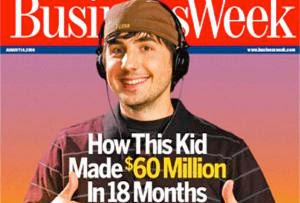
One thing I've learned as a veteran of the online publishing world and app store rat race is MSM journalists love to tell stories of the runaway successes by beginners. To give you an example, check out the inset BusinessWeek cover from 2006, "How this kid made $60 million in 18 months".

ebook hype

The young man on the cover of BusinessWeek is Kevin Rose, founder of Digg. He left his company a few years ago. He may have taken some money along the way, but it sure as heck wasn't $60 million. Digg was sold earlier this month for just $500,000.

If you look at Forbes, CNN, USA Today and other mainstream media outlets, you'll see the same types of attention-grabbing headlines. These articles do a great disservice, and lead to the following trends:

  • They make the public at large think anyone with products in these platforms are bound to be successful
  • They lead potential developers/content creators to think that it's a cinch for newcomers to become multimillionaires
  • They encourage large companies to think that they need to have a presence in these platforms

The result? Enormous hype cycles (anyone remember the scores of multinational companies rushing into Second Life?). Loads of "me-too" products and companies ("it's like Angry Birds ... but with cats!"). Unrealistic expectations ("all we need to do is grab 5% of the market and ..."). And bubbles (BitCoins, anyone?).

The same hype cycle has been building for ebooks. It's not just 50 Shades Of Gray, either. There's this Atlantic article trumpeting the fact that a technical review repurposed for ebooks sold 3,000 copies on the first day.

I recently published my first ebook, "Dropbox In 30 Minutes." A warning to anyone who expects thousands of downloads on the first day: Unless you are a brand or have the marketing commitment of a major online brand like Ars (the publisher of the technical ebook), you'll be lucky to get a few downloads per day. Yes, it's possible to raise those numbers on your own, but only through lots of hard work (writing quality content, marketing, etc.) and a huge dose of luck.

So, mainstream media journalists reading my blog post: Do your readers a favor, and be very careful with anecdotes of success in the digital media world.

And my message to potential ebook authors: Don't believe the hype.

Wednesday, July 18, 2012

KDP production: Word for Mac botches HTML

(UPDATE: Since this post was written in 2012, Amazon KDP has started accepting Microsoft Word .doc and .docx files. It is not longer necessary to convert Word documents to HTML first)

For my first technology e-book, a Dropbox guide for business and personal use, I handled all of the production on my own. That includes everything from cover design to uploading the manuscript to Kindle Direct Publishing (KDP) and Nook (PubIt).

I have been working with electronic publishing tools since the 1990s. The tasks and tweaks involved weren't difficult, but they did take a lot of time. There were also a lot of transitions. I wrote the draft in Google Docs, then switched to Microsoft Word, which is recommended by Amazon and Barnes & Noble for conversion to their respective mobile formats. The weekend of July 7-8 was devoted to taking my Microsoft Word (for Mac) master and preparing it for export to various e-book formats -- Kindle (which required HTML files), Nook (whose PubIt! service for authors uses a .docx file from Word) and PDF (which used Word and a Mac app called PDFOutliner to handle the table of contents).

Kindle was by far the most problematic. The issue wasn't KDP or the format that the KDP accepted, but rather the way that my content creation tool -- Microsoft Word (for Mac) -- handled critical tasks.

Let's step back. It's early July, 2012. This is my first e-book, and I need a resource to guide me through the steps. I turned to Mark Coker's excellent Smashwords Style GuideCoker style guideto get me up to speed, and also referenced Amazon's own publishing guidelines.

It seemed straightforward:

  • Do the writing and layout in Word.
  • Follow the requirements for the different platforms (example: KDP uses page breaks, PuBit uses section breaks).
  • Export (if required).
  • Convert/append (if required).

The last two steps were problematic. Some day I'll write about the challenges related to PDF publishing, but for this post, I want to concentrate on the KDP requirements and how Microsoft Word (for Mac) was unable to fulfill them.

Amazon's KDP program doesn't accept raw Word files. They want HTML, which is the language of Web pages. No problem. I've been doing it for years, and Word can even export to HTML. The Amazon documentation advises doing this:

  • Save your manuscript as a “Filtered HTML document” on your computer at a location you can easily find (such as your desktop). To do this, just follow these steps:
    • In Word, with your manuscript open, click the “File” tab, then click “Save As” and select, for example, “Desktop.”
    • For “Save as type:” select “Web Page, Filtered.”

When I did this, I ended up with an HTML file that contained the text as well as image and formatting references. Word also generated a folder full of exported images referenced by the .htm file.

I followed the other required steps to upload the files to Amazon. A few seconds later, Amazon spit out the .mobi file that Kindle can read. The KDP Web interface also had an emulator that let me see what the file looked like on different devices. And right away I noticed a problem:


The diagram in the picture above should be a lot larger. It should practically fill the entire width of the Kindle DX screen. But it only occupied about 1/3.

In fact, almost all of the .jpg screenshots that I so painstakingly built had been botched. First, they had been converted to larger .png files. Even worse, the dimensions of the files had been reduced. The PNG files were all 433 or 434 pixels wide, max. At that small size, details were difficult to see. On some of the large format devices in the emulator, they looked positively puny.

This was a real problem. The e-book was aimed at people who depended on larger screenshots to understand what Dropbox is. Tiny pictures simply wouldn't do.

I spent about two hours trying to reconfigure Word for Mac to output full-sized, full-quality images along with the raw HTML. It was not a problem to turn off PNG conversion, but the result was a conversion of many of my screenshots to horrible-looking GIFs. The image width on JPGs and GIFs was also limited to 433 pixels.

Eventually I had to dive into the HTML and XML that Word had generated and manually reference the larger original jpg files. A lot of resizing and renaming was involved. But I eventually wrangled an acceptable version into KDP.

I'm seriously thinking of using Google Docs for my next Kindle book. …

Tuesday, July 10, 2012

Want to understand Dropbox? Read this guide ...

What is Dropbox ebook
This week, I completed an unofficial guide for Dropbox and published it in several places. Titled Dropbox In 30 Minutes, it not only answers the question of "What Is Dropbox?" but also contains step-by-step instructions on how to get the most out of the online storage tool. Specific chapters and subsections include:
  • Chapter 1: In The Beginning — Installing Dropbox
    • 1A. Dropbox requirements: It works practically anywhere!
    • 1B. Installing Dropbox
    • 1C. The Dropbox website
  • Chapter 2: Getting Down To Business — Files And Folders
    • 2A. How it works
    • 2B. Saving your first file
    • 2C. Working with folders/groups of files
    • 2D. Opening a file or folder from a second computer
  • Chapter 3: Going Mobile — Dropbox On Smartphones And Tablets
    • 3A. Downloading files
    • 3B. Uploading files
  • Chapter 4: Dropbox Linking And Sharing
    • 4A. Limited sharing via links
    • 4B. Sharing folders with other Dropbox users
  • Chapter 5: Dropbox — The Rogue FAQ
    • How can I get free space?
    • How secure is Dropbox?
    • What happens when I quit Dropbox from the System Tray (Windows) or Menu Bar (Mac)?
    • How do I delete Dropbox?
    • Help! I accidentally deleted an important file!
    • Dropbox seems to be taking a long time to sync. What gives?
    • I see a folder called “Public” in my Dropbox account. What’s that about?
    • What happens when the same file is opened simultaneously on more than one computer?
    • Are the paid Dropbox accounts worth it?
    • Why would I want to link my Facebook account to Dropbox?
    • What are third-party apps, and how do they relate to Dropbox?
The story behind "Dropbox: The Rogue FAQ" is I wanted to answer some questions that official FAQs would never address. In addition, I have used a conversational/humorous tone throughout the ebook, which I hope readers will appreciate.

To buy the book. go to the official "Dropbox In 30 Minutes" website.