Showing posts with label Google. Show all posts

Monday, October 9, 2017

Google Adwords bans my ad, citing "Revisionist Concepts" and "Anti Content"

Google appears to be getting ready for re-entry into the People's Republic of China or Soviet Russia, judging by the "Revisionist Concepts: Unacceptable Anti Content" notification I received from the Google Adwords team for one of my AdWords ad campaigns for Lean Media.

Here's what the advertisements looked like. I created four simple text ads promoting the book and the Lean Media framework:
Anything seem wrong? These ads are about as milquetoast as you can get. Yet AdWords reviewers or algorithms thought the ad contained extremely offensive ... something. See for yourself: 
The message says "Unacceptable Anti Content ... Google policy does not permit the advertisement of revisionist concepts."

What does that even mean? The email doesn't explain, and Google's support website was no help either. Honestly, it sounds like something a Communist Party official might hand down to a hapless journalist or dissident before sentencing him or her to the gulag.

To be clear: Lean Media is a production framework for people who create media. The 50,000-word book I wrote is apolitical, non-offensive, and encourages media creators to make better media that audiences love. There are tons of real-world examples, from an art-photography publisher in China to global media brands like Minecraft and The Simpsons. Even if the book were related to politics or some other controversial subject, there's no reason Google should ban it ... at least not in this country.

Putting on my tinfoil hat: What I suspect happened is my recent public criticisms of Google AdWords about misleading settings for locations and ad fraud got noticed, and someone flagged it for additional review. "Anti-content" was the only thing they could come up with, and they banned the ad.

Do no evil, indeed.

Tuesday, August 5, 2014

Xiaomi's Redmi phone is not an Apple clone

I am using a Xiaomi "Redmi" phone (紅米) in Taiwan. Xiaomi is rapidly gaining a reputation in the mobile industry as a company that makes solid Android phones for a great price — but also a company that rips off others, especially Apple.

First, my brief review of the Redmi phone. I was blown away by the "Miui" interface they cooked up — it’s the slickest Android UI I have seen so far (scroll down to see an image). It definitely takes cues from Apple, but I also feel that Xiaomi has done some solid design work of their own — for instance, the icons for basic functions and system apps are original and quite effective.

But in other areas the Redmi doesn’t come close to Apple. The hardware looks and feels more like some of the midrange LG phones I’ve used in the past, and compares poorly not only to the iPhone but also recent Samsung and HTC phones. I’ve also discovered a lot of buggy behavior that I’ve never seen in any Android device, including an inability to delete photos (the dialog reports I don’t have permission) or apply system updates. I have spent about an hour trying to fix both problems and searched online for solutions but so far there is no help to be found, meaning that I now have to carry around my U.S. iPhone to take photos. In addition, a buggy dictionary combined with a poor virtual keyboard means that many of my texts are filled with typos and unwanted periods.

If Xiaomi doesn’t improve the hardware and fixes bugs like this, I predict that the “Xiaomi is copying Apple” complaints will eventually die down. But in the meantime, it’s interesting to see a Chinese device manufacturer rise to such prominence, especially after Taiwanese companies (Acer, HTC) struggled. I really hope Xiaomi gives Samsung and Apple a run for their money, because competition boosts innovation while keeping prices down.

Xiaomi Redmi phone review

Wednesday, April 2, 2014

Healthcare: A promising vertical for Google Glass?

Last month, I spotted a very interesting blog post about Google Glass by John Halamka, M.D., the CIO of one of Boston's largest research hospitals. Google Glass, a virtual reality system embedded in a pair of eyeglasses, has been given a bad rap in the media by a series of minor controversies involving whether people are recording or photographing things that they shouldn't. But the usage of Glass that Halamka describes is one of the few examples that I've seen of the technology providing a measurable improvement over older technologies -- in this case, emergency room systems used to present patient information to doctors and other staff.

Dr. Halamka is one of those rare CIOs who truly embraces the cutting edge of information technology -- ten years ago he had an RFID chip containing his medical information embedded in his arm. He is very interested in promoting discussions around new technologies and what they can do to improve healthcare. Working with Emergency Room staff at Beth Israel Deaconess Hospital, he developed a prototype system for doctors to retrieve certain types of information through Google Glass. In a blog post titled Wearable Computing at BIDMC (since removed from the Web), he described how it worked, as well as some of the issues around usage of the technology:
When a clinician walks into an emergency department room, he or she looks at bar code (a QR or Quick Response code) placed on the wall.  Google Glass immediately recognizes the room and then the ED Dashboard sends information about the patient in that room to the glasses, appearing in the clinician’s field of vision. The clinician can speak with the patient, examine the patient, and perform procedures while seeing problems, vital signs, lab results and other data.

Beyond the technical challenges of bringing wearable computers to BIDMC, we had other concerns—protecting security, evaluating patient reaction, and ensuring clinician usability.

Here’s what we’ve learned thus far:

Patients have been intrigued by Google Glass, but no one has expressed a concern about them. Boston is home to many techies and a few patients asked detailed questions about the technology. Our initial pilots were done with the bright orange frames—about as subtle as a neon hunter's vest, so it was hard to miss.

Staff has definitely noticed them and responded with a mixture of intrigue and skepticism. Those who tried them on briefly did seem impressed.

We have fully integrated with the ED Dashboard using a custom application to ensure secure communication and the same privacy safeguards as our existing web interface. We replaced all the Google components on the devices so that no data travels over Google servers. All data stays within the BIDMC firewall.

We have designed a custom user interface to take advantage of the Glass’ unique features such as gestures (single tap, double tap, 1 and 2 finger swipes, etc.), scrolling by looking up/down, camera to use QR codes, and voice commands. Information displays also needed to be simplified and re-organized.

We implemented real-time voice dictation of pages to staff members to facilitate communication among clinicians.

Google Glass does not appear to be a replacement for desktop or iPad—it is a new medium best suited for retrieval of limited or summarized information. Real-time updates and notifications is where Google Glass really differentiates itself. Paired with location services, the device can truly deliver actionable information to clinicians in real time.

Here’s a real BIDMC experience described by Dr. Steve Horng

"Over the past 3 months, I have been using Google Glass clinically while working in the Emergency Department. This user experience has been fundamentally different than our previous experiences with Tablets and Smartphones. As a wearable device that is always on and ready, it has remarkably streamlined clinical workflows that involve information gathering.

For example, I was paged emergently to one of our resuscitation bays to take care of a patient who was having a massive brain bleed. One of the management priorities for brain bleeds is to quickly control blood pressure to slow down progression of the bleed. All he could tell us was that he had severe allergic reactions to blood pressure medications, but couldn’t remember their names, but that it was all in the computer. Unfortunately, this scenario is not unusual. Patients in extremis are often overwhelmed and unable to provide information as they normally would. We must often assess and mitigate life threats before having fully reviewed a patient’s previous history. Google glass enabled me to view this patient’s allergy information and current medication regimen without having to excuse myself to login to a computer, or even loose eye contact. It turned out that he was also on blood thinners that needed to be emergently reversed. By having this information readily available at the bedside, we were able to quickly start both antihypertensive therapy and reversal medications for his blood thinners, treatments that if delayed could lead to permanent disability and even death. I believe the ability to access and confirm clinical information at the bedside is one of the strongest features of Google Glass. "

We have been live clinically with Google Glass for a limited set of four emergency physicians serving as beta users since 12/17/13. Since then, we have been working on improving stability and adding features to improve usability. Some of these modifications include the addition of an external battery pack, increasing the wireless transmission power, pairing the headset with our clinical iPhones, using head tilt to control vertical scrolling, revamping our QRcode reader to improve application stability, adding an android status bar to show wireless connection strength and battery power.

In addition to our four beta users, we've also had impromptu testing with at least 10 other staff members since 1/24/14 to get feedback to refine the user experience.

As a device being used in clinical care, we needed to rigorously test our setup to ensure that the application is not only reliable and intuitive, but improved the workflow of clinicians rather than impede it.

I believe wearable computing will replace tablet-based computing for many clinicians who need their hands free and instant access to information.
Google Glass healthcare experiment Halamka BIDMC
Dr. Halamka indicated that the pilot was a success, and said a full roll-out was anticipated in the coming weeks.

It should be interesting to see if this learning experiences of this experiment can be applied to other medical settings, not just at BIDMC but also other hospitals and clinics. Of course, besides improving the interface and other aspects of the data being delivered to caregivers, developers need to consider how the technology may impact other aspects of running a hospital and interacting with patients. VR may be a large chasm for patients and some staff to cross, and there is also the issue of whether the usage of such technologies requires FDA input.


Friday, October 26, 2012

What is Google Authorship?

This morning, I received a notification that I had joined Google Authorship (see screenshot, below). I had never heard of this service and assumed it had something to do with the three books I have authored, including one (an unofficial manual for Excel and other spreadsheet programs) that was published just last night.

It turns out it wasn't. If you look at the following screenshot, you'll notice that it mentions that I've added "Google Authorship markup":

Google Authorship notice

I don't know what "Google Authorship markup" is, but suspect it's related to my heavy blogging activity over the years (including recent product sites based on Google Blogger, such as Dropbox In 30 Minutes and Google Drive And Docs In 30 Minutes) as well as the fact that I've circulated some recent posts and product pages on Google Plus.

Indeed, clicking through to the "search results" link at the bottom of the Authorship notice, I'm taken to fourteen SERPs of mostly blogs, Google Plus entries, and some YouTube videos I've created over the years. The list is not complete -- I've written more than 1,000 pieces of indexed content if Computerworld and non-Google blogs are included. But the Google Authorship collection online has a limited selection of posts that are tied to my main Google account.


Friday, August 31, 2012

Branding Google Drive

Google Drive book

Over the past two weeks, I have been preparing book #3 for publication. It's now out. This Google Docs for dummies alternative is available through my product website, and offers an easy way to get up to speed on Google Docs, Google's powerful online office suite. It also covers Google Drive's offline storage capabilities. However, as I explain in the book, the storage features aren't nearly as good as Dropbox.

One of the new sections in the book gets into the tricky issue of branding Google Drive. As old-school users know, it's been "Google Docs" for more than five years, but this year Google began changing the branding to "Google Drive". Instead of accessing Google Docs through docs.google.com, it's now drive.google.com. While "Google Drive" may be a good fit for the storage features (and helps it compete with Dropbox and iCloud), it does not represent the office suite (Google Documents, Spreadsheets, Presentations, Drawings, etc.). However, I've noticed on a Google Apps help page that "Docs" is not completely going away:

When Google Drive first launches, the name of the service in the control panel will change from Docs to Drive and Docs.

However, in the consumer version of Google Docs, it's only branded "Google Drive". It's confusing for users. The only way to keep things sane is to refer to the office programs as "Google Docs" and the file/storage components as "Drive".

Wednesday, August 15, 2012

How to disable iCloud as the default save destination in OSX

Yesterday, I installed Mac OSX Mountain Lion on my MacBook Pro. This version of the Macintosh operating system is very closely integrated with iCloud -- maybe too closely integrated. I like the cloud computing concept for file backups and storage (after all, I wrote a manual for Dropbox) but iCloud really gets in your face. It's the default destination for opening and saving files, which I find very irritating. I've built a file folder hierarchy using the local hard drive, Dropbox and Google Drive, and don't want iCloud to be the default destination.

So I changed it. Here's how:

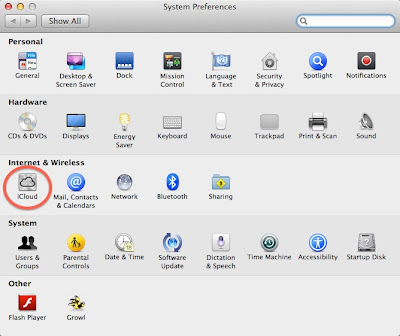
Open System Preferences by clicking the Apple icon in the upper left corner of the screen. Then press the iCloud icon, circled in the following screenshot:

iCloud System preferences change settings

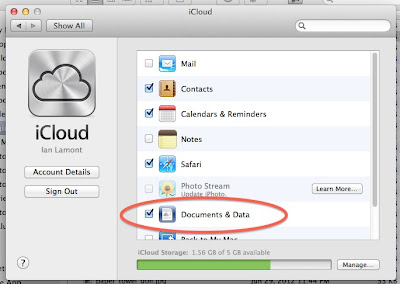
Then deselect the "Documents and Data" checkbox, as shown below:

iCloud documents and data checkbox

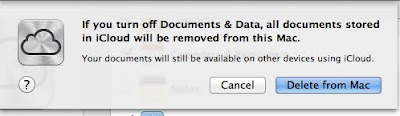
You will be prompted with the following warning:

icloud warning

It sounds drastic. It means is that documents stored in iCloud (from any iCloud-enabled device you own) are no longer synced to your computer. But it also gets rid of iCloud as the default destination for saving or opening files.

It would be great if Apple simply had an option to treat iCloud as a folder on your hard drive, much in the same way Dropbox and other cloud storage systems such as Google Drive work (see also my manual for Google Drive). Or, Apple disabled iCloud as the default "save" location.

But the company has two reasons for integrating iCloud so tightly into your Mac's storage and file systems:
  1. iCloud only has 5 GB of free storage. By forcing iCloud as the default storage location, the limit will rapidly be crossed and some people will be forced to upgrade to paid storage plans.
  2. Apple wants to make sure that its personal cloud storage system triumphs over competing products such as Dropbox and GDrive.

If enough people start turning off iCloud, Apple may rethink its approach to the iCloud user experience. On the other hand, as long as the competition is so strong, and the market for personal cloud services is still in its infancy, Apple may be forced to stick with the current setup.

Tuesday, July 17, 2012

Google's new approach to small businesses: Hand-holding

Here's a sign that Google's self-help tools are failing when it comes to an important customer segment:

Google small business

The backstory: For years, Google has been trying to crack the local business market. Getting accurate business information (addresses, type of business, etc.) and building engagement with small businesses is critically important to services such as Google Maps, Google Places, and AdWords. Google built out easy-to-use tools for small businesses to get online, and did everything they could to encourage them to start using these services ($50 AdWords credits, etc.)

But there's a problem. Most small businesses don't see the value of Google services, and/or are afraid it's too hard to figure out. There may also be some backlash relating to Groupon and other local daily deals sites, whose pushy salespeople may be scaring some business owners away from all online services, including Google.

Whatever the reason, Google has decided to do something extreme: Actually offer hands-on, in-person help to local small business owners. This is totally against Google's character (try getting a Google employee on the phone!) but in this case drastic measures are required. 

The picture above tells most of the story; if you scroll down the page on the original ad the messaging talks about Google services being fast, free, and easy.

Thursday, March 8, 2012

rel=canonical bullshit in Blogger

Ask anyone who has attempted a Google Blogger to WordPress migration what their biggest headaches are, and the answer will probably be "canonical bullshit." It's unfortunate, because rel="canonical" would otherwise be an acceptable solution to the problem of duplicate content. Although canonical support is implemented in Blogger, the way they've done it makes it hard to have a clean canonical link to the new Wordpress content.

I'm not sure this was always the case. This blog post explains how to add canonical links pointing to a new site, but when I tried it I discovered that Google has done something that leaves an extra canonical tag in the header. If you look at the template in Blogger, you won't see any reference to "canonical" but if you check the source code it turns up, and points to the URL of the source code.

Why does Google do this? I don't know. But I know how the canonical code is getting added, via this bit of code in the template:

<b:include data='blog' name='all-head-content'/>

The result for me: after manually adding another bit of code to add a canonical link to a new wordpress blog, I found that the resulting blogspot page now has two canonical links: One pointing to my new wordpress blog page, and one to the original blog page on blogger. This surely is a big no-no to Google, and might have a detrimental effect on ranking if the algorithm thinks I am trying to confuse it for illicit means.

I am tempted to delete so I can have dedicated canonical links pointing to just the wordpress page, but doing so would unfortunately strip out other necessary code, including charset, favicon.ico, a bunch of RSS code, and several scripts that help with rendering in IE and other functions.

For what it's worth, I have written a book about using Google Blogger for small businesses. There are lots of tips on how to use Google Blogger to build a business website, but I don't delve into the code too much (aside from a little CSS).

Blogger settings rel=canonical
Blogger settings page
 

Sunday, January 8, 2012

Google Earth overlays

In the past year, I have had a few chances to play with Google Earth and try out some of the amazing tools that come with the program. For the Social Television class I took at the MIT Media Lab, I used placemarks, 3D buildings, and zooming animation to create the software demo for our final project. More recently, I was able to use Google Earth to create Craigslist coverage maps that show the rough boundaries of the five Craigslist areas in Massachusetts.

How did I make the different-colored areas in Google Earth? By using overlays. It's a drawing function that lets users trace points on a map with a mouse. Once the points are joined, the area looks filled in. Different colors and transparencies can be applied, which lets overlapping areas be clearly shown (see the Invantory blog post, above for an example of overlapping overlays).

Overlaps are an extremely useful tool. For instance, in the map below, I wanted to show Newton, Massachusetts, and nearby communities and commuter destinations using different-colored overlays. I basically hand-matched the inner overlay to the actual boundaries of Newton, which are a display option in Google Earth. The outer overlay was hand-drawn according to municipal boundaries as well as my own rough estimate of the area of downtown Boston that many Newton residents commute to every day:


Google Earth is a free download. I recommend using a reasonably recent and powerful desktop computer, as it uses lots of processing power to run and render sophisticated 3D images.

Sunday, December 25, 2011

500,000 page views

Last month, one of my blogs passed a major milestone: 500,000 page views. The Statcounter report is here:
500,000 page views for my blog
Some other relevant data about this figure: Statcounter has been measuring traffic on that blog since 2005 or 2006. I have been also running Google Analytics on the same blog, but it shows a lower figure -- about 400,000 page views for the same period but still shows about a quarter-million unique visitors (differences between the two tools are shown here). I've generated several thousand dollars in AdSense revenue from the blog over the years -- not enough to live on, but a welcome addition these days considering I have no other income from the classifieds startup that I cofounded.

These numbers may not be impressive. After all, some blogs may get that much Web traffic in a single month. But what I find so interesting is that well over half the traffic to Harvard Extended has come to the blog after I stopped updating it in late 2008. In other words, people still find great value in content that's between three and six years old. It may not be "fresh", but it's deep and relevant and useful to them (average time spent by each visitor is more than 90 seconds, according to Google Analytics).

Google, of course, has helped bring most of this traffic, either directly through search or indirectly through references from other blogs or news sites that were originally sourced via search. But there are also people who have bookmarked it, or know about it through reputation and remember the URL.

Friday, November 25, 2011

TMobile monthly 4G + Samsung Exhibit II = Android on the cheap


I'm one of those cell phone cheapskates. You know, the guy who didn't own a mobile phone until it was absolutely necessary, and then only got the cheapest phone/plan options possible -- or got it through his employer. For the past few years, I have been using AT&T GoPhone/Pay-As-You-Go plans and the cheapo Nokia feature phones that come with them. A few weeks ago, however, I joined the elite, getting a snazzy Android phone (Samsung Exhibit II) and a really reasonable carrier plan -- the $30 TMobile Monthly 4G plan -- through Walmart. I'll give a quick review of the phone and the T-Mobile plan below.


First, a relevant fact to this review is that while I have been a cellphone cheapskate for a decade, I am actually a pretty heavy iOS user. I don't own an iPhone, but we have an iPad at home as well as two iPod touch devices. The newer one (4th generation) has been something that never leaves my side -- I use it for email, photos, twitter, Instagram, the Weather Channel app, music, and about a dozen other regular uses (I have wi-fi at home and work, which enables a pretty good mobile experience at these locations). If I had the funds to afford an $80 or $90 monthly iPhone plan through AT&T or Verizon, I would have gotten an iPhone, but I don't. But my work as co-founder of Invantory (a company that is developing a Craigslist app) was getting more intense and requires more frequent calling. This forced me to get a new phone plan with more capacity.

I began hearing about the TMobile Monthly4G plan in October, offered through Wal-Mart. It sounded great -- the cheapest option cost $30 per month, included unlimited texting and Web (first 5G at 4G speeds, 2G thereafter) and 100 minutes of talk, with 10 cents per minute thereafter.

This worked out to be far better than the AT&T GoPhone plan, which costs $25 for 100 minutes of talk and charges 25 cents for additional minutes. AT&T texting is 20 cents and data is similarly expensive and practically unusable on the tiny Nokia browser and terrible e-mail interface. Virgin reportedly had a similar plan to T-Mobile, but it was $5 more per month.

T-Mobile/WalMart offered a bunch of different phones, but I was really set on Android -- it was an iPhone-like experience and will eventually become a platform for Invantory's mobile classifieds. T-Mobile had an Android phone called the Samsung Dart, but it had poor reviews (including poor voice quality). The Samsung Exhibit II, however, sounded much better, and worked with the new monthly4G plan.

The plan had just been launched, so I began visiting local Wal-marts to look for the phone and try it out. It was useless. The boxed phones for the Tmobile Monthly 4G plan were there, but they were feature phones and the Dart. The Exhibit II wasn't in stock, and staff had no idea what I was talking about (even in a store which the Walmart website listed as having it "in stock"). The phone was also supposed to be available through T-Mobile stores, but at a 25% markup ($250 vs $200 in Walmart). I eventually gave up seeing the phone in person and just ordered it online through Walmart.com.

Out of the box, the phone worked well, but there were some hiccups. Here's the low down:

Activation and voice service
  • Activation via live T-Mobile customer service is a problem if you want the $30 plan -- for some reason the reps only have another $30 plan (1500 talk and text, see screenshot below) and will direct you to register online if you want the 100 minutes talk/unlimited Web & text.
  • It didn't seem to be a problem to get a phone number in my area code (I mention this because a long time ago it used to be an issue with new mobile phones, or you'd be assigned a phone in the 857 area code)
  • Even though T-Mobile apparently charges minutes against some plan users who make calls on their Wifi signals. "Wifi Calling" is not counted against the Monthly4G plan minutes -- I talked with a customer service representative to confirm this. After conducting a test, I determined that Wifi Calling is counted against your minutes, and another T-Mobile rep confirmed this (contradicting what the first one said). Therefore, I advise turning off Wifi calling and putting the load on the T-Mobile network. You're paying for it either way, might as well make T-Mobile work for it and reconsider their policy. 
  • The Samsung Exhibit II has a excellent voice quality, and I have yet to have a dropped call.
  • 4G coverage seems reasonably good in and around the Boston area, even on some subway lines (MBTA Red Line, but not the Green Line)
Exhibit II hardware
  • The Exhibit II is a very lightweight phone that has a somewhat slippery plastic case -- it will easily fall out of loose pockets when you are sitting down.
  • The processor is adequate, but I have noticed that sometimes it hangs (especially if you are awakening it from sleep with an app already open).
  • Storage is paltry compared to my 4th-generation iPod touch -- USB storage is listed as 1.6 GB, and device memory >800 MB. It's not a problem for people who don't have a lot of media on their phones, but if you are a heavy music, photo, or video user you will have to get an SD card.
  • The battery seems to charge fast. However, I generally have to charge it once every 36 hours 15 hours, leaving it on all the time with relatively low voice usage and high "other" usage (surfing, camera, apps, email, etc.). Update: Battery life seems to be getting worse as time goes on. Part of this relates to the fact that I am using more apps and talking more often on it, but it seems the decline is excessive, even though I am shutting off GPS and often disabling Wifi (note: Disabling wifi apparently increases battery usage, owing to the fact that the device is constantly searching for 4G signals. I've found the best tactic is to leave wifi on all day). The batteries in my iPod touches are far more resilient after many thousands of hours of heavy wifi, app, and camera use.
  • Screen quality: Excellent! At 480 x 800, the dimensions are slimmer than the iPod touch (640 x 960 pixels), but the resolution seems comparable.
  • Photo syncing via USB doesn't work with my two-year-old iMac and iPhoto. But sharing to Dropbox from photo app on the Exhibit II partially makes up for that problem.
  • The Wifi receiver is adequate, with slightly less range than the iPod touch. Switching between Wifi/Edge/3G/4G happens in the background and works well.
Camera

This is probably my biggest beef with the phone. Here are the pros and cons:
  • The resolution of both the front-facing and rear-facing cameras are acceptable and superior to my 4th generation iTouch. 
  • The flash works very well in low-light settings. 
  • But the lag for shooting is sometimes as long as two seconds, which makes setting up shots of people and moving objects difficult and irritating. Auto-focus is apparently to blame, and it can't be turned off (although you can switch to a pretty nice macro setting). 
  • There is no "camera+" or Instagram app for the phone, which is a big negative for someone coming from the iOS universe.
  • The other problem is color -- reds and oranges are definitely muted, as you may be able to see from the photo below. The wood floor actually has a richer color, and the red and yellow legos are a very bright, child-friendly color in reality (the reds below should be fire-engine red, but they're not). The blues, meanwhile, are too strong -- in this photo the detail on the blue boxes can't be seen from afar because the color is so intense.

Samsung Exhibit II test

Android Software
  • Once you get used to Android (my Exhibit II came installed with Android 2.3.5 "Gingerbread") it's a wonderful platform. But getting used to some of the quirks takes time. There are other negatives, too, which I will detail first.
  • "Settings", "My Accounts" and "Accounts and Sync" and individual app settings contain overlapping information and controls. It can be hard to find what you are looking for, and difficult to do certain things such as turning off notification sounds (although there is a "Sound Settings" option, it does not control all sound settings -- you'll have to root around in various apps to turn everything off). 
  • For other settings, I still haven't figured out to adjust them -- such as turning off or changing the startup/power down sounds. How do you turn off the "recharged" sound, so it doesn't wake you up in the middle of the night? I have no idea. iOS is far superior, centralizing all system settings and many app settings in a single place ("Settings"), and making it very easy to disable all sounds.
  • To get carriers to adopt Android, Google made the operating system customizable to a certain extent. The result: Most American carriers, including T-Mobile, load up their phones with crapware which apparently can't be deleted. I got T-Mobile TV HD, T-Mobile Mall, Kies Air, Blio, Yelp, an antivirus program, "Bonus Apps", and bunch of other stuff I didn't want and cluttered up my screens. As it is apparently impossible or difficult to delete them, I had to create a special screen to hold them. Apple forces carriers to stay away from the crapware  practice and allows people to easily delete apps and files, which makes iOS far superior for new users. 
  • Android confusingly has separate "Home" and "Apps" screens, both of which can be customized. iOS only has one view, and allows you to place files and Web bookmarks on it, giving it the same prominence as apps.  
  • Apps: Android does not win on quality (as a more open system, there are a lot of crappy apps out there) but the process of downloading, installing, and trying out the apps is much faster -- no need to enter an iTunes password each time or hunt for the app once it's installed. I installed lots of apps, including Dropbox, Instagram and Google Docs for Android (explained in detail in this Google Docs for Dummies clone)
  • Email: Android's default email app looks better and seems to work faster than iOS on wifi. My only complaint is "mark as unread" is not available (it is, however, an option in the Android Gmail app). 
  • Sync: I've always felt that iOS syncing (and now iCloud) is imperfect. I'll set stuff up, such as Google calendar, and it doesn't seem to get imported into my iPod's Calendar app. But Android really rocks -- you can even attach and group Facebook and twitter accounts, which makes for a better Contacts list. 
  • Customization: If you can find the right options, you can do some pretty neat things, such as setting up live wallpapers that move (a swirling galaxy is one of the defaults). iOS will surely catch up, though.
  • Keyboard and voice input: The Android keyboard is not as good as the one on iOS devices. This is partially the result of the Exhibit's narrower screen, but I also find myself having to "aim" a little high to press the right character. On the other hand, voice input integrated into the keyboard is superb. Just press the microphone on the keyboard (or next to the search magnifying glass), speak clearly, and you'll see it entered. It may not compare to Siri, but considering Siri is not available on most iPhones or any iPods, I'd say Android has the upper hand at the low end of the market.

I may have some other updates as time goes on and I use the phone more. But so far, so good.


Screenshot: Current TMobile Monthly 4G rates:

Tmobile monthly 4g plan rate sheet

Saturday, January 22, 2011

Dear Matt Cutts: The SEO spam and content farm problem is not "better than it has ever been"

(Update below) I use Google Alerts to keep abreast of certain topics, such as my MIT program and mentions of my name. The automated search results that are emailed to me are interesting, particularly the ones based on my name. They almost always look like this:


The results are garbage, filled with contextually unrelated and bizarre terms such as "Lamont Arizona" or "lamont rupture disk." The links in the screenshot above take users to a page filled with links about Georgia real estate and references to many random terms (including my name), while the Danish site contains scores of random terms that include my last name (such as product or business names -- "Lamont auto", etc.), but no links. They contain no useful information about me or any other topic, yet pages like them are generated every week and added to Google's index. I looked back at my email archive, and found that pages created more than a year ago are still active.

What is their purpose? Pages like this are machine-generated SEO spam, designed to get eyeballs on pages filled with advertisements, or to boost the search-engine ranking of linked sites. Google's wonderful search engine depends on language in headlines and page text as well as inbound links to determine which sites deserve to be at the top of search engine results when certain terms are typed in. That's great for quality sites which have lots of inbound links and deserve to be at the top because they are likely to be the most relevant and useful for users.

The problem is the system has been effectively reverse-engineered by spammers and content farms who are adding little, if any value with spam pages and poorly written trash or copied content that are boxed in by ads and affiliate links. In some cases, the pages don't contain any ads, but lots of links to other pages that someone wants to raise in the search engine rankings. Links and search-engine ranking translates to money if the keyword is popular or relates to something that people research online with the intention of buying. The ultimate prize for the spammers and content farms is getting their garbage on the first page of Google search results. The fact that quality pages (or the original content) that people are more likely to be interested in are pushed down or off the page are of little concern to them.

So I read with some interest a post by Google's Matt Cutts on the company's recent efforts to fight the problems described above. He said:
January brought a spate of stories about Google’s search quality. Reading through some of these recent articles, you might ask whether our search quality has gotten worse. The short answer is that according to the evaluation metrics that we’ve refined over more than a decade, Google’s search quality is better than it has ever been in terms of relevance, freshness and comprehensiveness.
Say what? I don't know what sorts of metrics Google is using, but I see poor quality results showing up in almost all of the searches that I perform. Not always on the first page -- on a Google search for my own name, there are enough high quality results (my blogging and social networking activity, plus references to other people with the same name) that push the garbage off the first page of search engine results. Still, starting at the top of page 3 of the results, I see results for bogus/scammy paid ringtone and "fast download" schemes attached to copyrighted technical mp3s that I produced for Computerworld when I was an editor there. Besides being illegal, such pages are not the original source of the mp3s (the pages on Computerworld.com are) yet the scraped content repackaged into paid services ranks higher than the originating site, which offers the mp3s for free.

For popular terms, however, the garbage routinely outranks the real thing. For instance, when you search for "online education," affiliate garbage dominates the first page of results. I am sure practically everyone reading this post has had a similar experience, attempting to conduct some serious research using Google and on the first page of results being presented with trick sites or utter drivel. It wastes users' time, and in some cases gives people false or misleading information. Organized hacking and crime rings have also joined the party -- for one of the bogus mp3 sites I observed, the credit card payment server is located in Russia. How many innocent people have attempted to pay for something through this system, and have ended up having their credit card information stolen or malware downloaded to their computers?

I also found it strange that Google is bragging about quality while the main problems that people were criticizing the company for in December and January -- low-quality content farms and scrapers -- still clog up search results (see one humorous example described on this Hacker News thread). Certain keywords are basically useless to find quality content on the first page of results (Wikipedia sometimes ranks high, but the quality is often questionable). SEO-driven content farms have simply taken over.

To Cutts' credit, he tried to respond to some of the questions and criticisms on Hacker News, but it is premature to crow about "quality" when spam, low-quality information, and other garbage fills search engine results. The problem clearly has not been fixed.

Update: Matt Cutts and debated the definition for "quality" and what an increase in spam and content farms does to Google's quality metrics. Part of the Twitter thread can be accessed here.

Related posts:

Disclosure: I am not a spammer or content farm, but I do use Google Adsense and Amazon Associates, and rewrite my headlines to improve their search engine ranking. 

Sources and research: Google, Paid Content, Techmeme, my own experience.

Monday, May 31, 2010

Google's news vision misses "boots on the ground"

James Fallows, writing for The Atlantic, has published a fascinating but mistitled feature on Google's approach to the news industry ("How to save the news", June 2010 issue.)

I say "fascinating" because it's probably the most complete public airing of the company's views of the news industry to date. Fallows interviewed at least a half-dozen executives -- from engineers to senior news executives like Krishna Bharat and CEO Eric Schmidt -- about their views of news processes and advertising.

I say "mistitled," because judging by the account in The Atlantic, there are no convincing strategies or products in Google's pipeline that will save the news industry as we know it. As you'll see below, I think Google is missing (or underestimating) several key points about the nature of the news business.

The article is several thousand words long, and strangely contains not a single link or commenting interface. If you're pressed for time, there is a summary by AllThingsD's Peter Kafka located here. I've left the following comment on the AllThingsD article, relating to a few crucial elements that Fallows missed (or Google avoided discussing?) that I think are crucial to an understanding of the display advertising ecosystem and news:

I read the Atlantic piece, and was struck by a couple of things.

First, local business display advertising, which is an important part of many newspapers' revenue models, was not discussed. If local newspapers are counting on sufficient online display ad revenues, they (and Google) will need to address the problem that relatively few local businesses are savvy enough or sufficiently interested in online display advertising, even though Google (and Facebook, ESPN, etc.) have tried their darndest to make it easy for them.

Here's something else to consider: The only way most newspapers and other local publications including phone books and magazines have been able to sign up local businesses for local print campaigns is by employing boots on the ground to cold call and visit in person these companies, and pressure them into buying ads. That is not the Google way.

Another issue that I think the Atlantic author did not press Google on concerns the massive oversupply of online information sources for people to turn to, including media from all over the world, company websites, social networks, shopping sites, forums, etc. The increase in the amount of available pages on which to serve ads, combined with the decreased amount of time that people will spend on news sites because they are too busy updating their Facebook feeds or looking at Wikipedia, will depress the prices of news pages that contain display advertising.

One last thing: Eric Schmidt was quoted as saying the following:

"In the future model, you’ll have subscriptions to information sources that will have advertisements embedded in them, like a newspaper. You’ll just leave out the print part. I am quite sure that this will happen."

To me, this seems like a 1990s vision of the future of news -- basically duplicate online what newspapers are doing in print. While this is already happening, it's not working. Considering the two points listed above and the many other online trends working against the news industry, I am skeptical of Schmidt's vision as stated in Atlantic.

The "boots on the ground" reference is something I picked up when I talked to a few pros who've been working PR and marketing in the Boston area for years: Most local business ads are sold by salesmen working the phones or going door-to-door in neighborhoods. The commissions are low, so volume is key -- they work quickly and try to get as many sales as possible per day. It's apparently a point of frustration for restaurants, florists, boutiques and other stores -- they don't like the pestering or the costs and they can't easily recognize the value of most print campaigns. But they often give in. They recognize that they should be doing some marketing, to bring new business in the door or to be recognized as part of the community. While some are interested in trying out online ads or seeing people referred by Yelp, Foursquare, or Groupon, many others do not want to get involved in the technology or are not familiar with how online display advertising works or can benefit them. Some businesses are not keen on online because they have grown up with traditional marketing practices and/or think that their target market won't see them (I actually heard this from a national manufacturer that makes outdoor equipment a few years ago -- most of their customers are in their mid-40s or older, so why bother with online?).

Finally, while some traditional newspaper companies have tried hard to migrate local businesses to online advertisers, I still see some major failures in the marketplace, including the Boston Globe, which is owned by the New York Times company. Relatively few of their print advertising customers are converted to online display ad customers. Part of this could be reluctance on the part of vendors and local businesses to make the jump, but I also suspect that the sales organization still operates in a 20th-century frame of mind, where big commissions are tied to print and online is an afterthought.

Sources and research: Interviews with various Boston-area PR/marketing agencies, Boston.com, The Atlantic, AllThingsD, ilamont.blogspot.com

Saturday, April 24, 2010

Google News: Still flawed


Spotted a few minutes ago on Google News, in the "Spotlight" section:

Pathetic, isn't it? I'm not just talking about low-quality "birther" nonsense showing up on the same page as legitimate news and analysis aggregated from sources all over the world. I'm also referring to the fact that the algorithm(s) Google uses to pick and highlight "news" for inclusion on its popular aggregator has been flawed for years, and the company is apparently unwilling or unable to fix it.

In 2005, I documented how Xinhua, China's state-run news and propaganda agency, was one of the main sources for Google News. Last year, a made-up Onion story was listed in the top block of Google News between real breaking news about swine flu vaccines and Canadian politics. Now it's bottom-feeding political muckraking from a conspiracy theorist. What's next? 

Is Gave Rivera's human-assisted news aggregator, Techmeme, a superior model? I don't like the fact that stories and blog posts about Apple tend to stay up at the top of the list for long periods of time, but I never see wing-nut bloggers (believe it or not, they exist in the tech news world, too) showing up, either. 

Some of my other posts about Google News, Techmeme, and algorithmic editors:

Tuesday, January 19, 2010

OK Go's YouTube problem


By its own account, OK Go owes its success to YouTube. The band says that a viral video at the dawn of the Internet video era (this would be "A Million Ways," or "Here It Goes Again", about four years ago) put it on the map, and since that time, it has seen YouTube as an important part of its marketing strategy.

But there's a little problem now, says OK Go in an open letter: While anyone can view the band's new videos on YouTube, you can't embed them in a blog post, like I did a few days ago with Hug a Pug. This means the viral potential is severely limited, as the video can't be easily shared with fans' own mini-audiences on blogs and fan sites.

Why has OK Go's record label, EMI, hobbled one of its most popular artists by disabling embedding of the band's videos? Because there is no way to monetize the videos, says vocalist Damian Kulash. YouTube runs ads next to and over videos showing on the site, and the videos producers can get a small cut of the ad revenue. On embedded videos, YouTube can also show ads, but respectable (i.e., deep-pocketed) advertisers often don't want to have their ads running in unknown blogs or sites that post the videos.

Kulash says that the issue illustrates the larger problem of a 20th-century industry trying to keep up with the new digital reality (sound familiar?):
What we’re really talking about here is the shift in the way we think about music. We’re stuck between two worlds: the world of ten years ago, where music was privately owned in discreet little chunks (CDs), and a new one that seems to be emerging, where music is universally publicly accessible. The thing is, only one of these worlds has a (somewhat) stable system in place for funding music and all of its associated nuts-and-bolts logistics, and, even if it were possible, none of us would willingly return to that world. Aside from the smug assholes who ran labels, who’d want a system where a handful of corporate overlords shove crap down our throats? All the same, if music is going to be more than a hobby, someone, literally, has to pay the piper. So we’ve got this ridiculous situation where the machinery of the old system is frantically trying to contort and reshape and rewire itself to run without actually selling music. It’s like a car trying to figure out how to run without gas, or a fish trying to learn to breath air.

So what about Hug A Pug, a YouTube video which can be embedded on blogs? Well, as I pointed out in my earlier post, the company that produced the music video (Ganz) is not trying to sell songs. They're trying to sell something else. Songs like Hug A Pug are purely promotions for other products -- namely, Ganz's stuffed animal line (Webkinz), and the virtual world based on the animals (Webkinz World). In other words, Hug A Pug doesn't need to run ads because it is the ad.

There are alternatives for embedding video, including MySpace and Vimeo, and OK Go has made its latest music video available on both services (see video below). But YouTube's huge reach and advertising potential are issues that the music industry are trying to balance, which means that for the time being the song won't be seen that much outside of YouTube.com and a few other sanctioned places.


OK Go - This Too Shall Pass from OK Go on Vimeo.

(Link: Hacker News)

Sunday, November 15, 2009

Google News Bias

Google News is the gold standard when it comes to algorithm-driven news aggregators. It's updated every few minutes, tracks breaking news across multiple topic areas, and is reasonably well integrated with Google's regular search engine.

It's also seriously biased ... or broken. I usually check it several times per day, and imagine my surprise when I saw this (click to see larger version of screenshot):
Google News bias
A made-up Onion story from last month, listed between real breaking news about swine flu vaccines and Canadian politics?

And a Wikipedia article, listed prominently as the background source for the Jaycee Lee Duggard kidnapping? I thought the Ivy League whiz kids at Google realized Wikipedia is a notoriously unreliable source for information about famous people and many other topics, and is frequently manipulated by spin doctors, SEO consultants, and vandals. I mean, that's one of the reasons Google created Knol, right?

But there's another problem with the results, one that's been nagging me for the past few months. Every single one of the top headlines for each of the topics comes from an old-school, traditional mainstream media organization -- 19th- and 20th-century print or broadcast news outfits, most backed by giant media conglomerates or billionaire founders. CNN, Reuters and the New York Times Co. don't have a monopoly on information or opinions, but with this kind of help from Google, they continue to preserve their dominant market positions in the new online playing field.

It's disappointing, but not entirely unexpected. Google News has had problems with its algorithm for years. For instance, unreliable foreign news sources used to be featured prominently on the site. Part of this related to an apparent desire to diversify sources of information to include non-Anglo-American media outlets (see my 2005 post about Xinhua's unlikely inclusion as a primary news source) as well as some foreign publications taking advantage of or manipulating Google News to get more traffic to their sites. Google has since tweaked the algorithm, but I fear it's been too far in the opposite direction. The same, tired old voices that one sees on newsstands and TV screens -- as well as a few quirky sources that should not be considered sources of "news" -- now take center stage on Google's automated news platform.

Some of my other posts about Google News, Techmeme, and algorithmic editors:

Sunday, October 25, 2009

Google Visualization API

After seeing this video, reading the API documentation, and playing around with some of the scripts, I'm realizing that this great toolset is making an impact on a lot of startup Web services. Google Finance uses it, and I saw another Twitter-based service that incorporated some of the charts as well in just the past week. The best things about the Google Visualization API: It's free, it's based on javascript, it's relatively easy to use, and it dovetails into people's existing Excel/spreadsheet projects. Geek out ...